Alternate Page with Proper Canonical Tag: An SEO Specialist's Practical Guide
Learn what "Alternate page with proper canonical tag" means in Google Search Console, when it's normal, and when to fix it.

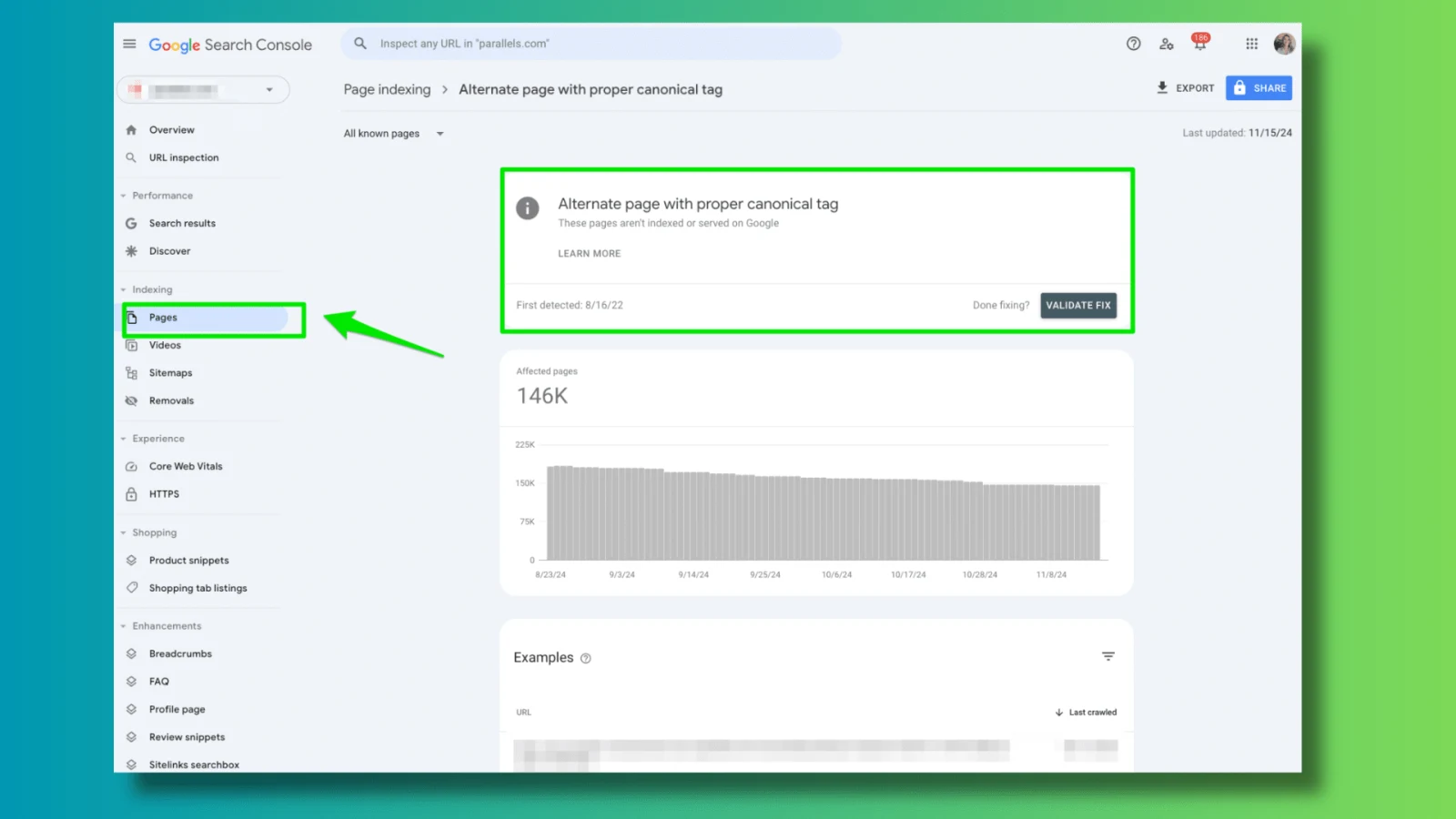
"Alternate page with proper canonical tag" is one of the most frequently misunderstood statuses in Google Search Console's Page Indexing report. Many SEO practitioners either panic and attempt aggressive fixes, or dismiss it entirely as harmless. Both reactions can damage search performance when applied without proper diagnosis.
This guide explains the status from a practical technical SEO perspective what it actually means, the full range of causes across different website types, when it represents a genuine problem, and how to resolve each scenario correctly without harming rankings.
What is "Alternate Page with Proper Canonical Tag"?
Direct answer for featured snippet:
"Alternate page with proper canonical tag" is a Google Search Console indexing status indicating that Google discovered a URL, found a canonical tag on it pointing to a different URL, and chose to respect that canonical by not indexing the alternate version. The page was excluded from the index intentionally not as an error, but as a canonicalization decision.
This status means four specific things happened simultaneously:
- Google crawled and discovered the URL in question
- A
rel="canonical"link element was present on that page - Google accepted and respected the canonical tag
- The alternate URL was excluded from indexing in favor of the canonical URL
The Critical Distinction: Status vs. Error
Understanding this status requires recognizing that it is an indexing decision, not an error message. Google Search Console's Page Indexing report separates pages into indexed and not-indexed categories. "Alternate page with proper canonical tag" falls under "Not indexed"—but not-indexed does not automatically mean something is wrong.
The canonical tag mechanism exists precisely to create this outcome. When you implement <link rel="canonical" href="https://example.com/preferred-url/"> on a page, you are explicitly instructing search engines not to index the current URL and instead attribute all signals to the canonical URL. When Google follows this instruction correctly, the result is this status.
The question is not whether this status is "good" or "bad" it is whether the pages appearing with this status are the ones you intended to exclude, and whether unintended pages are incorrectly receiving it.
For broader context on canonical tag mechanics, review our guide on Google ignoring canonical tags.
How Canonical Tag Indexing Works
Understanding the mechanics of how search engines process canonical signals helps diagnose whether alternate page statuses are working correctly.
The Canonicalization Process
When Google's crawlers visit a URL, they follow a sequential evaluation process:
- Crawl the URL: Googlebot fetches the page content and HTTP headers
- Identify canonical signals: Checks
rel="canonical"in<head>, HTTP Link header, and XML sitemap declarations - Evaluate consistency: Determines whether signals from all sources agree on the canonical URL
- Make a canonicalization decision: Selects one URL as canonical based on all signals
- Index or exclude: Indexes the canonical URL, marks alternates as "Alternate page with proper canonical tag"
Google treats canonical tags as strong suggestions rather than absolute directives. If conflicting signals exist for example, the canonical tag points to URL A while internal links consistently reference URL B Google may override your canonical preference and select its own canonical.
When the status appears in Search Console, it confirms Google accepted your canonical suggestion for those specific URLs.
Link Equity Consolidation
A fundamental purpose of canonical tags is consolidating link equity (PageRank) across duplicate or near-duplicate URLs. When a page has backlinks distributed across five URL variations:
/product-page               (40 backlinks)
/product-page?ref=email     (25 backlinks)
/product-page?utm_source=   (20 backlinks)
/category/product-page      (15 backlinks)
/product-page/              (10 backlinks)
Without canonical tags, link equity fragments across all five versions. With canonical tags pointing all variations to /product-page, all 110 backlinks consolidate into a single authoritative URL.
The alternate page status confirms this consolidation is occurring correctly.
Common Causes of Alternate Page Status
Based on real-world experience across multiple projects, these scenarios consistently produce the "Alternate page with proper canonical tag" status.
Cause 1: URL Parameter Variations
URL parameters are the most common source of alternate page appearances. Search engines discover and crawl parameterized URLs through internal links, external links, and direct discovery.
Common parameter types creating alternates:
| Parameter Category | Examples | Volume Risk |
|---|---|---|
| Marketing tracking | ?utm_source=, ?utm_medium=, ?ref= | High (per campaign) |
| Session management | ?sessionid=, ?PHPSESSID= | Very High (per user) |
| Content filtering | ?sort=, ?filter=, ?order= | Medium |
| Pagination | ?page=2, ?p=3 | Medium |
| Cache busting | ?v=1.2, ?cache=clear | Low |
| Referral tracking | ?from=, ?source= | Medium |
When canonical tags are correctly implemented, all parameter variations point to the clean base URL, and each appears as an alternate page in Search Console.
Normal situation: A small, stable number of parameter alternates appearing consistently Problematic situation: Thousands of new parameter alternates appearing suddenly, indicating uncontrolled parameter creation
Manage parameter URLs systematically using our guide on crawl budget optimization.
Cause 2: Category and Subcategory URL Paths
News websites and content-heavy platforms commonly make articles accessible through multiple category paths simultaneously.
Example—Same article, multiple access points:
/politics/election-results-2026          (Category path)
/national-news/election-results-2026     (Subcategory path)
/breaking-news/election-results-2026     (Tag path)
/2026/02/election-results-2026           (Date archive path)
Each path provides identical article content. With canonical tags pointing all variations to the primary URL (typically /politics/election-results-2026), the three alternative paths appear as alternate pages.
This is a very common and largely intentional outcome in custom CMS platforms and news sites. For comprehensive analysis of how this affects news sites specifically, review our guide on category URL SEO problems and our analysis of same news article available on multiple URLs.
Cause 3: Pagination and Faceted Navigation
Pagination creates a series of URLs serving portions of the same content collection:
/category/              (Page 1 - canonical URL)
/category/?page=2       (Alternate)
/category/?page=3       (Alternate)
/category/?page=50      (Alternate)
When canonical tags point paginated pages to page 1 (or a "view all" page), every paginated URL appears as an alternate page. For faceted navigation on e-commerce sites, this multiplies dramatically:
/products/shoes/                           (Canonical)
/products/shoes/?color=black               (Alternate)
/products/shoes/?color=black&size=10       (Alternate)
/products/shoes/?color=red&brand=nike      (Alternate)
A site with 500 product categories and 20 filter combinations per category generates 10,000 potential alternate pages from faceted navigation alone.
Cause 4: HTTP/HTTPS and WWW/Non-WWW Variations
Protocol and subdomain inconsistencies create URL variations that often receive the alternate page status:
http://example.com/page          (HTTP - should redirect)
https://example.com/page         (Canonical - HTTPS preferred)
http://www.example.com/page      (HTTP+WWW)
https://www.example.com/page     (HTTPS+WWW)
If canonical tags are implemented on the HTTPS version while redirects are absent or misconfigured, Google may crawl all four variations and mark three as alternate pages. This is frequently caused by mixed-content issues or incomplete SSL migration.
Cause 5: Trailing Slash Inconsistency
Seemingly minor URL differences create genuine duplication from a search engine's perspective:
https://example.com/about-us      (No trailing slash)
https://example.com/about-us/     (Trailing slash)
Linux servers typically treat these as separate resources. Without consistent 301 redirects or canonical tags enforcing one version, Google crawls both and marks one as alternate. Enforce a consistent standard using redirect chains guidance.
Cause 6: Case Sensitivity in URLs
Linux-based servers (which host most websites) treat URL paths as case-sensitive by default:
https://example.com/Blog/Post-Title      (Uppercase)
https://example.com/blog/post-title      (Lowercase - preferred)
https://example.com/BLOG/POST-TITLE      (All uppercase)
All three are technically distinct URLs on Linux servers. Without server-level redirects normalizing to lowercase, search engines may discover multiple variations through inconsistent internal links or external links.
Cause 7: Internal Linking Inconsistency
Internal links pointing to non-canonical URL versions are one of the most underestimated causes of alternate page proliferation. When navigation menus, breadcrumbs, related content modules, and body links point to different URL variations, search engine crawlers follow all paths and discover multiple versions.
Example of inconsistent internal linking:
Header navigation:    /products/ (with trailing slash)
Footer links:         /products  (no trailing slash)
Breadcrumbs:          /Products/ (capitalized)
Related content:      /products/?ref=related
Sitemap:              https://example.com/products/
Google receives five different "preferred" versions through internal signals, creating confusion about which URL should canonicalize. Fix internal linking issues systematically using our guide on fixing broken internal links at scale.
Cause 8: Incorrect Canonical Implementation
When canonical tags exist but point to wrong destinations, the alternate page status appears for wrong reasons:
Implementation errors producing incorrect alternate statuses:
<!-- ERROR: Canonical points to 404 page -->
<link rel="canonical" href="https://example.com/deleted-page" />
<!-- ERROR: Canonical points to redirected URL -->
<link rel="canonical" href="https://example.com/old-url" />
<!-- /old-url 301 redirects to /new-url -->
<!-- ERROR: Multiple canonical tags on same page -->
<link rel="canonical" href="https://example.com/url-a" />
<link rel="canonical" href="https://example.com/url-b" />
<!-- ERROR: Canonical chain -->
<!-- Page A canonicals to B, Page B canonicals to C -->
<!-- ERROR: Self-canonical missing on intended canonical page -->
<!-- /preferred-url/ has no canonical tag at all -->
Each error prevents proper signal consolidation. Google may ignore invalid canonicals and select its own canonical URL, or mark pages with conflicting signals as alternate for unexpected URLs.
When "Alternate Page" Becomes a Real SEO Problem
The presence of alternate page entries is expected and healthy in many scenarios. However, specific patterns signal genuine problems requiring investigation.
Warning Signs Requiring Action
1. Sitemap URLs appearing as alternate pages
If URLs you've explicitly submitted in your XML sitemap appear as "Alternate page with proper canonical tag," this indicates a contradiction: you're telling Google to index these URLs (via sitemap) while simultaneously telling it not to index them (via canonical pointing elsewhere).
This is the clearest signal that action is required. Either the sitemap should be updated to exclude these URLs, or the canonical tags need correction.
2. Sudden spike in alternate page count
A gradual increase in alternate pages as your site grows is normal. A sudden spike of thousands of new alternate URLs within days typically indicates a new source of URL proliferation—a new marketing campaign generating uncanonicalized parameter URLs, a CMS update creating new URL patterns, or a new navigation element creating additional access paths.
3. Important pages not appearing in search results
Use the URL Inspection tool in Search Console to check specific important pages. If a page you expect to rank shows "Alternate page with proper canonical tag," it means Google is attributing all ranking signals to a different URL. Either the canonical is incorrect (pointing to the wrong URL) or the wrong URL is being internally linked as the primary version.
4. Crawl stats showing unexplained increases
If Google's crawl statistics show significant increases in crawl requests without corresponding content growth, alternate page proliferation may be consuming crawl budget that should be allocated to discovering new content. This is particularly damaging for news sites where fresh content requires rapid discovery.
For comprehensive indexation analysis, review our guide on discovered but currently not indexed.
Impact Assessment by Site Type
| Site Type | Alternate Pages | Risk Level | Primary Cause |
|---|---|---|---|
| Small blog (<500 pages) | <50 | Low | UTM parameters |
| E-commerce (10K+ products) | Thousands | Medium-High | Faceted navigation |
| News website (50K+ articles) | Very High | High | Category/subcategory paths |
| Enterprise site (100K+ pages) | Extremely High | Critical | Multiple compounding causes |
How to Diagnose Alternate Page Issues
A systematic diagnostic approach identifies root causes before implementing fixes.
Step-by-Step Diagnosis Process
Step 1: Export the alternate page URL list
In Google Search Console, navigate to Indexing → Pages → "Alternate page with proper canonical tag." Export all affected URLs to a spreadsheet for analysis.
Step 2: Identify URL patterns
Sort and group exported URLs to identify dominant patterns:
- URLs containing
?utm_→ Tracking parameter issue - URLs with
/category-name/article→ Multi-category path issue - URLs with
?page=→ Pagination issue - Mixed HTTP/HTTPS → Protocol issue
- Trailing slash variations → Slash inconsistency
Step 3: Check canonical tag output
For a sample of alternate URLs, view page source and examine the canonical tag:
- Does a canonical tag exist?
- Does it point to the correct URL?
- Is it an absolute URL (not relative)?
- Does it create a canonical chain?
Step 4: Verify the canonical URL itself
Visit the URL specified in the canonical tag:
- Does it return HTTP 200?
- Does it contain a self-referencing canonical?
- Does its content match the alternate page?
Step 5: Compare with sitemap
Cross-reference alternate URLs against your XML sitemap. Any overlap requires immediate attention—sitemap and canonical signals must be consistent.
Step 6: Audit internal links
Use Screaming Frog or a similar tool to identify which internal links point to alternate URLs versus canonical URLs. Inconsistencies here reinforce duplicate signals.
Step 7: Review crawl stats
In Search Console's Crawl Stats report, examine trends in crawl requests. Spikes coinciding with alternate page increases identify when new URL sources appeared.
Comprehensive diagnostic methodology is detailed in our guide on diagnosing complex SEO problems using data analysis.
Best Practices and Solutions
Each cause requires a specific fix approach. Applying the wrong solution can create new problems.
Solution 1: Control URL Parameters at Source
The most effective approach is preventing unnecessary parameter URLs from being created or crawled.
Robots.txt parameter blocking:
User-agent: Googlebot
Disallow: /*?utm_source=
Disallow: /*?utm_medium=
Disallow: /*?ref=
Disallow: /*?sessionid=
This prevents crawling of known low-value parameters entirely. Use carefully—blocking parameters that carry meaningful content differences creates indexation gaps.
Canonical tags as backup:
<!-- On parameter pages, canonical to clean URL -->
<link rel="canonical" href="https://example.com/page/" />
For parameters that should remain crawlable (e.g., for analytics), canonical tags consolidate signals without blocking access.
Solution 2: Standardize URL Architecture
Enforce single canonical paths for all content through server-level redirects and CMS configuration.
# .htaccess - Force HTTPS and www
RewriteEngine On
RewriteCond %{HTTPS} off
RewriteRule ^(.*)$ https://www.%{HTTP_HOST}/$1 [R=301,L]
# Force trailing slash consistency
RewriteCond %{REQUEST_FILENAME} !-f
RewriteCond %{REQUEST_URI} !/$
RewriteRule ^(.*)$ /$1/ [R=301,L]
# Force lowercase URLs
RewriteMap lowercase int:tolower
RewriteRule ^([A-Z].*)$ /${lowercase:$1} [R=301,L]
Solution 3: Fix Sitemap Consistency
Sitemaps should list only canonical URLs. Any URL in your sitemap sending a different canonical signal creates contradictions.
Sitemap quality rules:
- Include only URLs that have self-referencing canonical tags
- Exclude all parameter variations
- Exclude non-canonical category paths for articles
- Use consistent URL format (HTTPS, www, trailing slash) matching your canonical standard
For comprehensive sitemap strategy, review our guide on creating scalable sitemaps for enterprise websites.
Solution 4: Standardize Internal Links
Conduct an internal linking audit and update all links to use canonical URLs consistently.
Audit scope:
- Main navigation menus
- Footer links
- Breadcrumb navigation
- Related content modules
- In-article contextual links
- Pagination links
- Author archive links
All internal links should use identical URL formats matching your canonical standard. Small inconsistencies in navigation templates can create thousands of non-canonical internal links when applied across a large site.
Solution 5: Fix Invalid Canonical Implementations
Address specific implementation errors identified during diagnosis:
Canonical chain resolution:
Current: Page A → canonical → Page B → canonical → Page C
Fix: Page A → canonical → Page C (skip intermediate)
     Page B → canonical → Page C
Missing self-canonicals:
<!-- Add to every canonical page -->
<link rel="canonical" href="https://example.com/this-exact-page/" />
Redirect target canonicals:
If /old-url 301 → /new-url
Canonical tag should point to /new-url, not /old-url
Fix implementation errors systematically to eliminate the incorrect alternate page appearances they generate. For detailed implementation guidance, see our guide on Google ignoring canonical tags.
Solution 6: Faceted Navigation Control
E-commerce sites with faceted navigation require deliberate strategy:
Canonical tag approach (recommended for most filters):
<!-- On /products/?color=black&size=10 -->
<link rel="canonical" href="https://example.com/products/" />
Noindex for low-value filter combinations:
<!-- For rare, low-traffic filter combinations -->
<meta name="robots" content="noindex, follow" />
Dedicated indexable pages for high-value combinations:
/products/black-shoes/          (Canonical, indexed, targets "black shoes")
/products/red-shoes/            (Canonical, indexed, targets "red shoes")
/products/?color=blue           (Canonical = /products/, alternate page)
This hybrid approach indexes the most commercially valuable filter combinations as proper pages while directing low-value parameter variations to canonical base URLs.
Real-World Case Study
During an audit of a high-traffic news portal with 50,000+ articles, the following alternate page distribution was discovered in Search Console:
| URL Pattern | Alternate Count | Status |
|---|---|---|
?utm_* parameters | 28,400 | Expected (canonical working) |
/subcategory/article paths | 18,700 | Expected (canonical working) |
/tag/article paths | 12,300 | Expected (canonical working) |
| Date archive paths | 8,900 | Expected (canonical working) |
| Sitemap URLs | 3,200 | Problem: requires fix |
| H1 redirect target | 840 | Problem: canonical chain |
| Deleted page canonicals | 420 | Problem: 404 canonical targets |
The first four groups were functioning correctly—canonical tags working as intended. The final three groups required fixes:
Sitemap overlap fix:
- Identified 3,200 article URLs appearing in sitemap that canonical to different URLs
- Cause: CMS generating sitemaps from category paths rather than primary article paths
- Fix: Updated sitemap generation logic to use canonical URL patterns only
- Result: Sitemap-Search Console contradictions eliminated
Canonical chain fix:
- 840 pages canonicaling to URLs that were themselves canonicaled to a third URL
- Cause: URL slug changes without updating existing canonical tags
- Fix: Bulk canonical tag updates pointing directly to final canonical URLs
- Result: Three-hop chains reduced to single-hop canonicals
404 canonical target fix:
- 420 pages canonicaling to deleted URLs returning 404
- Cause: Articles deleted without updating canonical tags on category path versions
- Fix: Updated canonical tags to point to current live URLs or removed defunct pages
- Result: Google stopped wasting crawl budget on invalid canonical targets
After resolving the three problem categories, overall organic traffic increased 18% within 60 days as Google redistributed link equity to proper canonical URLs and reduced crawl waste.
The key insight from this audit: The 68,300 correctly functioning alternate pages required no action. The 4,460 incorrectly appearing alternate pages were causing meaningful SEO damage. Without careful analysis, either mass intervention (disrupting working canonicals) or complete inaction (missing genuine problems) would have been harmful.
Professional SEO Assistance
Complex canonical management across large-scale websites, particularly those with custom CMS platforms, custom URL architectures, or high-volume dynamic content, often requires expert analysis to distinguish intentional from problematic alternate page statuses.
If your site shows:
- Thousands of alternate page entries in Search Console
- Important pages appearing as alternates unexpectedly
- Declining organic traffic alongside growing alternate page counts
- Sitemap URLs appearing as alternates
- Indexation problems despite consistent content publication
Professional SEO services can provide systematic canonical audits identifying exactly which alternate page statuses are intentional and which require correction—without disrupting properly functioning canonicalization.
As an SEO specialist with hands-on experience auditing custom CMS platforms, news publishers, and enterprise e-commerce sites, I provide:
- Full Search Console canonical audits
- URL architecture analysis and standardization
- CMS-level canonical configuration
- Sitemap and internal link consistency audits
- Ongoing monitoring after implementation
Book a meeting to discuss your specific canonical issues, or contact me for an initial assessment. Review case studies for examples of canonical improvements delivering measurable traffic results.
Frequently Asked Questions
Is "Alternate page with proper canonical tag" always a problem?
No. When canonical tags are working as intended—consolidating duplicate URL variations, parameter pages, and multi-path access points—this status confirms Google respected your implementation. It becomes a problem only when pages you expect to be indexed appear with this status, when your sitemap URLs receive this status (creating contradictory signals), or when the alternate page count spikes unexpectedly due to uncontrolled URL proliferation.
Should I remove canonical tags to get these pages indexed?
Generally no—removing canonical tags from legitimate duplicate URLs typically worsens SEO by fragmenting link equity and creating genuine duplicate content competition. Before removing any canonical tags, confirm the specific page should be indexed independently, that it offers unique value separate from the canonical URL, and that indexing it won't create keyword cannibalization. Canonical removal is occasionally appropriate but should be carefully evaluated rather than reflexively applied.
Why do some of my sitemap URLs appear as "Alternate page with proper canonical tag"?
This indicates a contradiction: your sitemap tells Google to index these URLs while your canonical tags tell Google not to. The most common causes are CMS generating sitemaps from all URL patterns (including non-canonical category paths) rather than just canonical URLs, sitemap generation logic not matching permalink settings, or manual sitemap entries not updated after URL structure changes. Fix by ensuring your sitemap contains only URLs with self-referencing canonical tags—URLs where the canonical points to itself rather than elsewhere.
How do I find which URL Google considers canonical for a given page?
Use Google Search Console's URL Inspection tool. Enter the URL you're investigating, and the tool shows both the "User-declared canonical" (what your canonical tag specifies) and the "Google-selected canonical" (what Google actually chose). If these differ, Google overrode your canonical for reasons including conflicting signals from internal links, sitemaps, or external links. When both agree and show the correct URL, your canonical implementation is functioning properly.
Can canonical tags be ignored by Google?
Yes—Google treats canonical tags as strong suggestions rather than absolute directives. Canonicals may be ignored or overridden when: the canonical target returns a redirect or 404 error, multiple conflicting canonical signals exist across different sources, internal links overwhelmingly point to a different URL than the canonical specifies, the canonical creates a chain (A→B→C), or the canonical points to a page with substantially different content. Consistent signals across canonical tags, internal links, and sitemaps significantly increases the probability of Google respecting your canonical preferences.
What's the difference between canonical tags and 301 redirects for resolving duplicate URLs?
Both consolidate duplicate URLs, but through different mechanisms. Canonical tags keep all URLs accessible to users while telling search engines which version to treat as authoritative—users visiting any variation see the page, but search engines attribute signals to the canonical URL. 301 redirects make alternate URLs inaccessible, automatically sending users and crawlers to the destination URL. Use canonical tags when users have legitimate reasons to access content via multiple paths (e.g., category navigation). Use 301 redirects when the alternate URL should no longer exist and all traffic should permanently consolidate to the new URL. Canonical tags appear in Search Console as "Alternate page with proper canonical tag"; properly configured redirects appear as the redirect destination URL.
How many "alternate page with proper canonical tag" entries is too many?
There's no universal threshold—context matters more than absolute numbers. A small blog with 200 pages showing 10,000 alternate entries faces a serious problem (50× amplification). An enterprise e-commerce site with 500,000 products showing 400,000 alternates from faceted navigation may be functioning correctly. Evaluate proportionality: alternates should represent URL variations of existing content, not multiples vastly exceeding your actual page count. Also evaluate composition: tracking parameter alternates are expected; sitemap URL alternates are not. Monitor trends over time—stable alternate counts indicate controlled canonicalization; growing counts indicate new URL proliferation sources.
After fixing canonical issues, how quickly does Search Console update?
Search Console typically reflects canonical changes within 2–4 weeks as Googlebot recrawls affected URLs and processes the updated canonical signals. However, the full impact on indexed page counts and traffic may take 6–10 weeks as Google consolidates ranking signals from all alternate URLs into the canonical URL. Large sites with many affected pages may experience longer processing times. Monitor the Page Indexing report weekly after implementing fixes, watching for the "Alternate page with proper canonical tag" count declining and the "Indexed" count increasing correspondingly.
Can hreflang tags interact with canonical tags for international sites?
Yes, and this interaction requires careful implementation. For international sites, hreflang tags declare language/regional relationships while canonical tags declare the preferred URL for indexing. Each language/region version should have a self-referencing canonical (canonicaling to itself) while also including hreflang tags pointing to other language versions. A common mistake is canonicalizing all language versions to a single URL (e.g., all to the English version) while also using hreflang—this creates a contradiction where Google is told to not index regional versions while also being told to use them for specific language/region combinations. Resolve international canonical issues using our guide on hreflang implementation errors.
For more technical SEO insights, explore our related content on technical SEO tips, SEO audit resources, and fixing duplicate content issues.

Written by Sadekur Rahman
SEO & Website Strategy Specialist at Pixelvega and SEO Executive at Daily Amar Desh. 6+ years helping brands grow with data-driven SEO.