Website Audit Checklist
Master website audits with our complete checklist. Learn how to audit a website for SEO using free tools, fix technical issues & boost rankings fast.

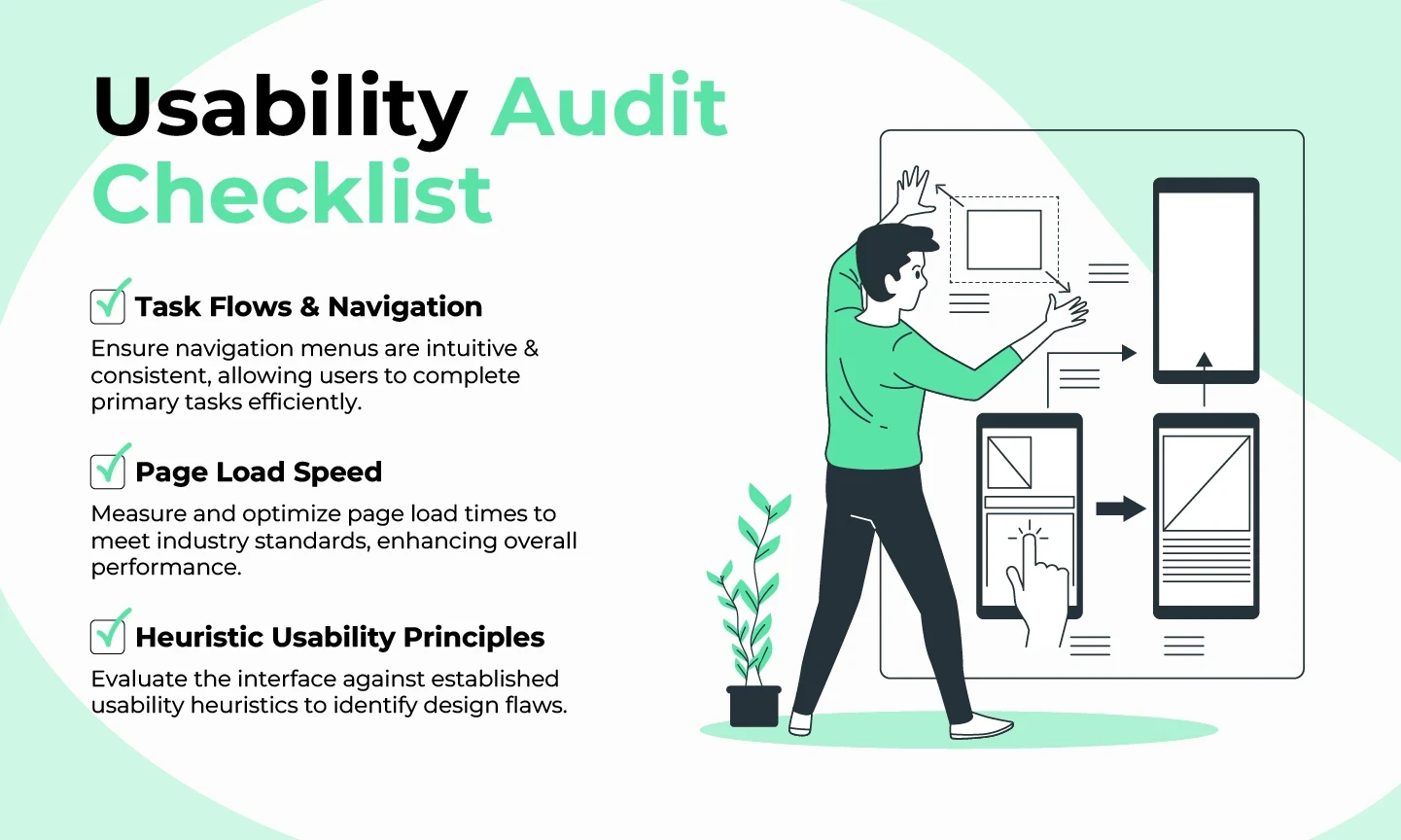
When was the last time you gave your website a thorough checkup? Just like a car needs regular maintenance to run smoothly, your website requires periodic audits to maintain peak performance and search engine visibility.
A website audit is your diagnostic tool for uncovering technical issues, content gaps, and SEO opportunities that could be holding your business back. Whether you're experiencing declining traffic, poor rankings, or simply want to stay ahead of competitors, understanding how to audit a website is essential for long-term digital success.
In this comprehensive guide, I'll walk you through everything you need to know about website auditing from understanding what a website audit entails to implementing a proven checklist that covers technical SEO, content quality, user experience, and conversion optimization.
What Is a Website Audit?
A website audit is a comprehensive analysis of your site's performance across multiple dimensions: technical infrastructure, on-page SEO, content quality, backlink profile, user experience, and conversion potential. Think of it as a health report card that reveals what's working well and what needs improvement.
The primary goals of auditing a website include:
- Identifying technical errors that prevent search engines from properly crawling and indexing your pages
- Discovering content optimization opportunities to improve relevance and rankings
- Uncovering user experience issues that increase bounce rates and reduce conversions
- Analyzing your competitive position and finding gaps in your SEO strategy
- Measuring site speed, mobile-friendliness, and Core Web Vitals performance
Unlike a one-time task, website audits should be conducted quarterly or whenever you notice significant traffic changes, algorithm updates, or after major site modifications.
Why Website Audits Matter for Your Business
Conducting regular website audits delivers tangible business benefits that directly impact your bottom line. Here's why audit a website should be part of your ongoing digital strategy:
Improved Search Rankings: Google uses over 200 ranking factors. A thorough audit identifies which factors need attention, helping you climb search results for valuable keywords.
Enhanced User Experience: Technical issues like slow loading times, broken links, and poor mobile optimization frustrate visitors. Audits catch these problems before they damage your reputation.
Increased Conversion Rates: By analyzing user behavior and identifying friction points in your conversion funnel, audits help you optimize paths to purchase or lead generation.
Competitive Advantage: Understanding how your site compares to competitors reveals opportunities they're missing and threats you need to address.
Cost Efficiency: Catching problems early prevents expensive fixes later. A small technical issue discovered during an audit could save thousands in lost revenue from poor performance.
According to recent industry research, websites that conduct regular audits see an average 35% improvement in organic traffic within six months of implementing recommendations.
This website audit checklist focuses on five key areas:
- SEO + performance
- Content
- Design + UX
- Accessibility
- Data privacy + security
SEO + Performance
Are Google Analytics & Search Console set up?
Google Analytics and Google Search Console (GSC) are essential tools for gathering performance data on your website (and completing some steps of this audit).
The easiest way to check if these are set up is to log into your Google account and navigate to each tool using the above links.
If you cannot see the website you’re auditing listed as a property, ask the website owner if they’ve got access and can add you. If they don’t, you’ll need to set up each of these properties for the website.
Is the sitemap file set up correctly?
Your sitemap file (if you have one) can be found in a number of ways:
- Add /sitemap.xml or /sitemap_index.xml to the end of your domain
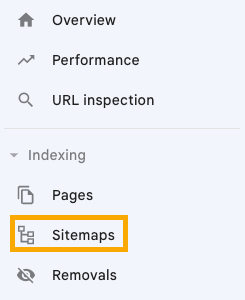
- Check GSC for any submitted sitemaps
- Try these advanced operators on Google: site:yoursite.com filetype:xml or site:yoursite.com ext:xml
If you can’t find your sitemap, chances are you don’t have one. You can set one up in WordPress with an SEO plugin like Yoast or RankMath. Otherwise, you can locate the XML sitemap settings within your website builder and set it up there.
Once the sitemap is set up, you can check there are no errors with a free Ahrefs Webmaster Tools (AWT) account.
- Crawl your website with Site Audit
- Go to All Issues
- Make sure there are no sitemap errors showing
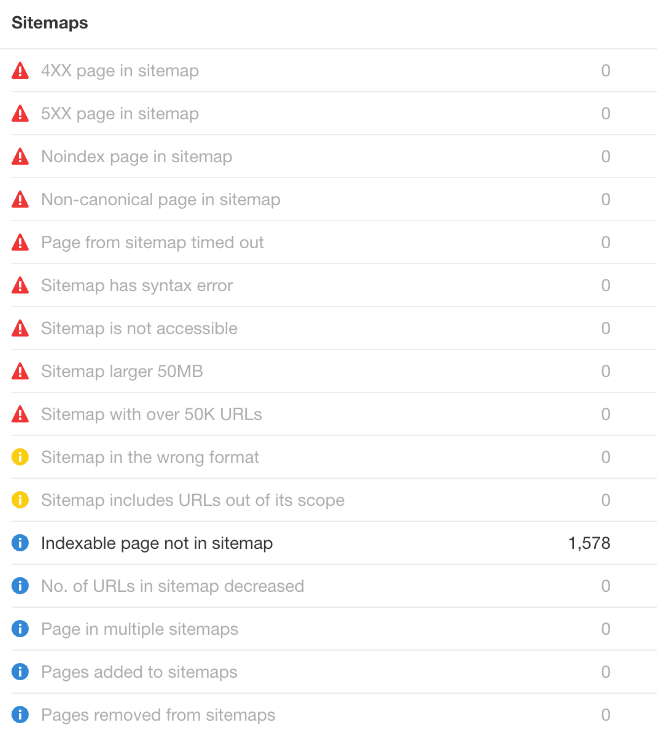
Finally, if your sitemap is not yet submitted to GSC, go ahead and add it.
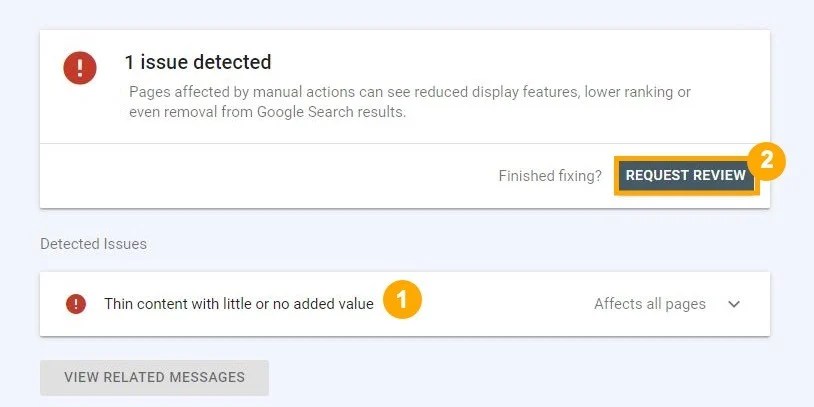
Are there any penalties or manual actions in Search Console?
In Google Search Console, navigate to “Manual actions” in the left-hand navigation.
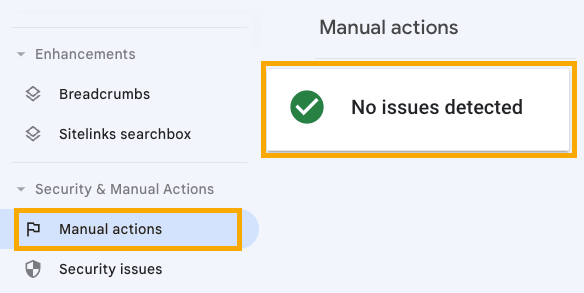
If you see anything other than “no issues detected”, follow the prompts to learn what you need to pay attention to and then request a review once you’ve fixed all issues.
Are all important pages indexable?
Pages can't show up in Google unless they're indexed, so all important pages must be indexable. You can check this with a free Ahrefs Webmaster Tools (AWT) account.
- Crawl your website with Site Audit
- Go to Page Explorer
- Filter for Noindex pages
- Eyeball the list for pages that should be indexed

Remove the noindex directive from any pages that should be indexed.
| TIP 💡 If there are too many pages to reasonably look through, filter for only URLs in the sitemap. If you're still seeing URLs in the filtered report, something is definitely wrong. Either you actually meant to noindex them (in which case, they shouldn't be in the sitemap), or they should be indexed and you need to remove the noindex directive. |
Are all important pages crawlable?
Google rarely indexes pages it can't crawl, so you need to make sure that all important pages on your website are crawlable. You can do this in Google Search Console.
- Go to Indexing > Pages
- Click the "Blocked by robots.txt" issue
- Make sure no important pages that you want to rank are listed here
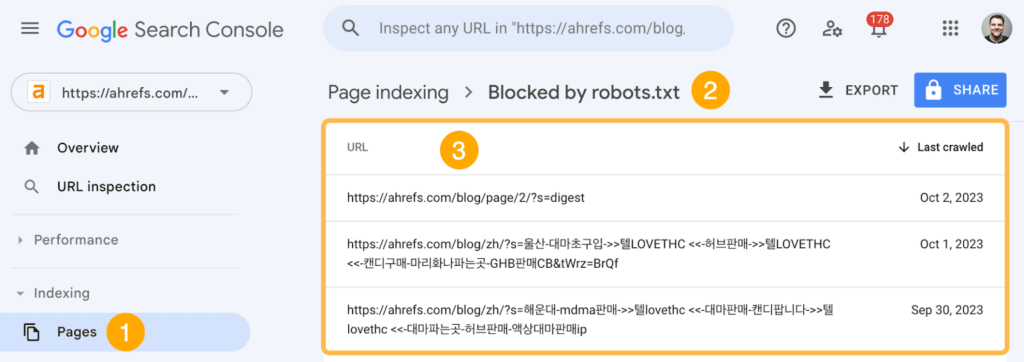
| TIP 💡 There's often lots of clutter in this report, like URLs with parameters (e.g., domain.com/search?=). You'll want to filter these out to make it easier to spot important pages. For example, if we filter out URLs with the ? parameter, we see no results. |
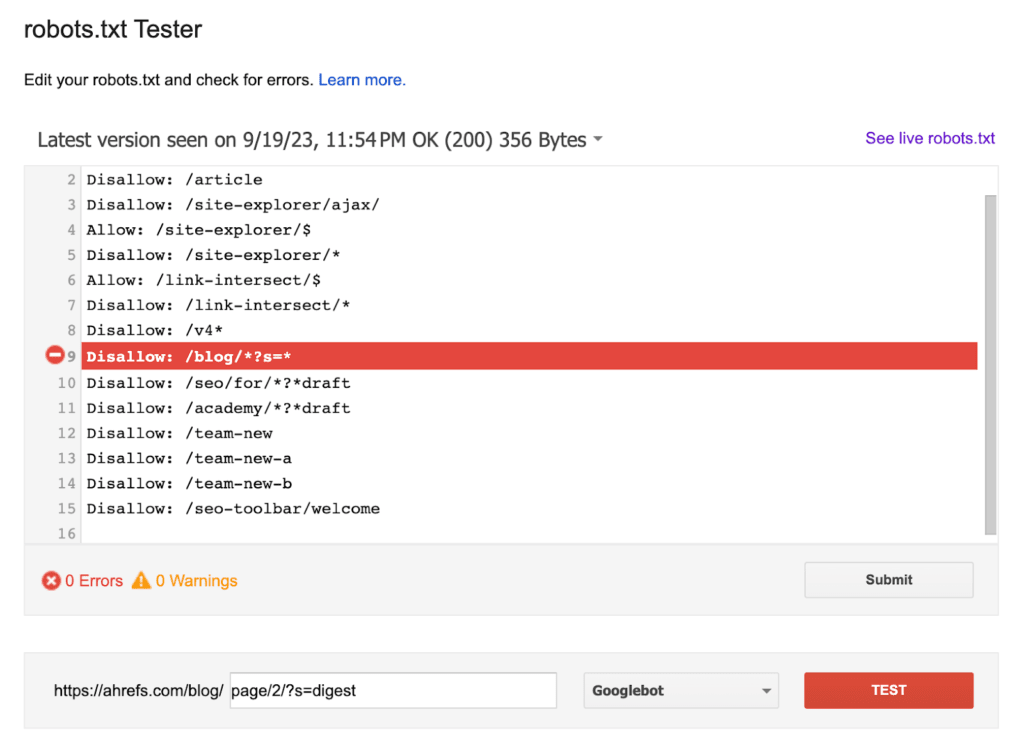
If you see important pages that should be crawlable, you'll need to remove or edit the rule causing this in your robots.txt file. You can use Google's robots.txt tester to find the affecting rule.
It's also best practice to make sure all important pages are internally linked so Google can find them. You can do this with Ahrefs' Site Audit. Just go to the Links report > "Issues" > look for the "Orphan page (has no incoming internal links)" issue.
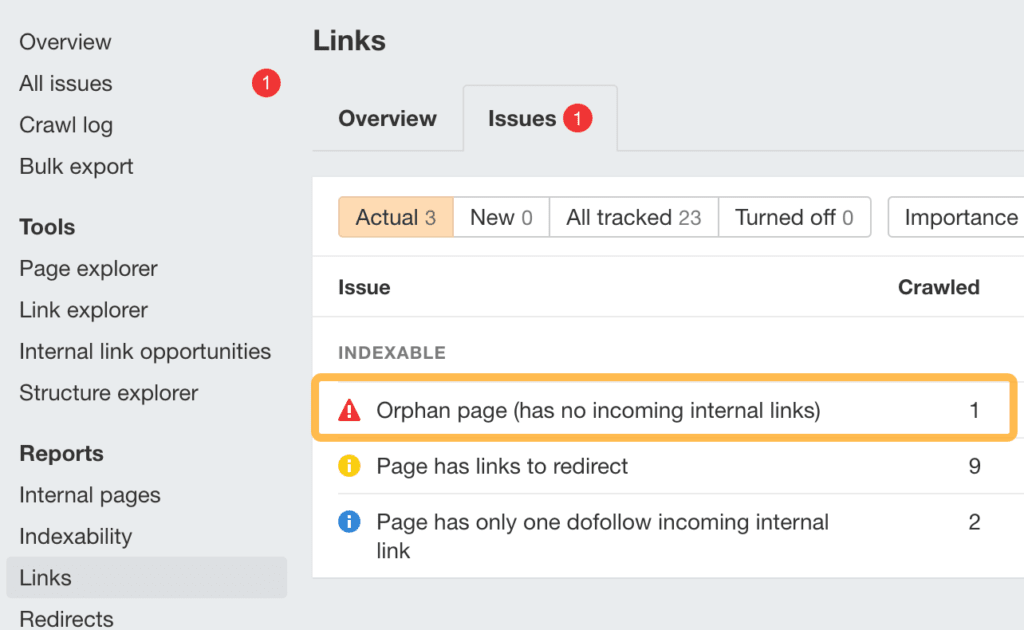
If any important pages are orphaned, add internal links to them.
Is your site free of other critical technical issues?
Sites can face all kinds of technical issues, but most aren't that important and "fixing" them won't really move the needle. You can find the most pressing issues to fix by filtering the All issues report in Site Audit for "errors."
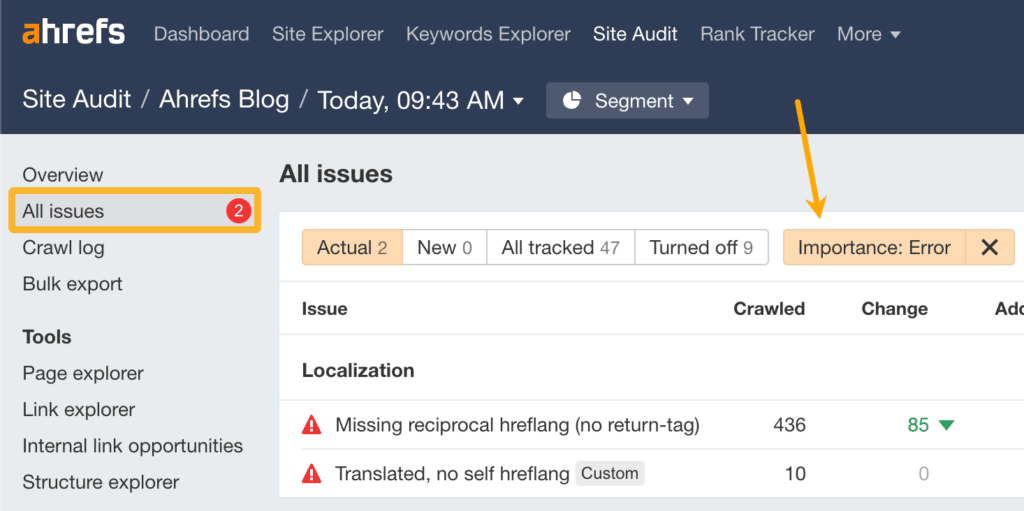
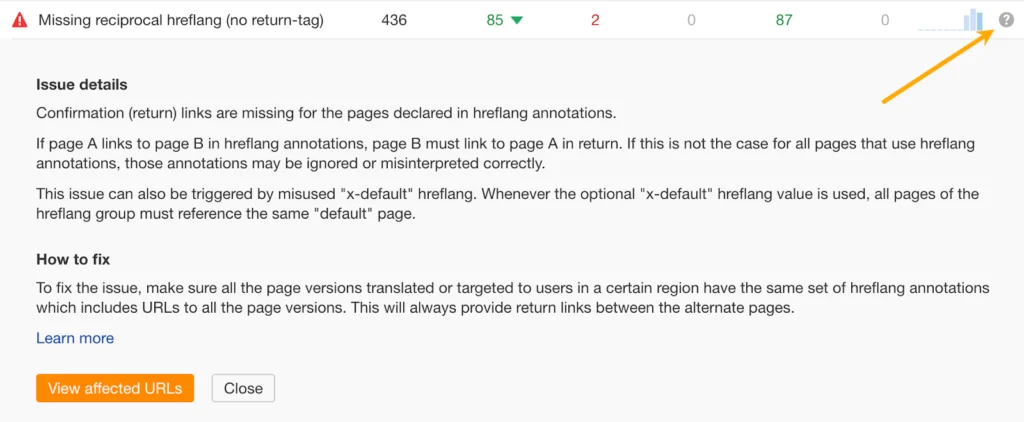
If you're unsure how to deal with any of them, click the "?" next to each issue to see a description and advice on how to fix it.
Has your site’s traffic remained stable after algorithm updates?
Most Google updates these days relate to content quality (e.g., Core Updates). If you see a traffic drop coinciding with one of these, it can often point to issues with your content as a whole. You can check for this in Ahrefs' Site Explorer.
- Enter your domain into Site Explorer
- Click the "Organic search" tab on the Overview report
- Look for traffic drops on the organic traffic graph (make sure Google updates is turned on)
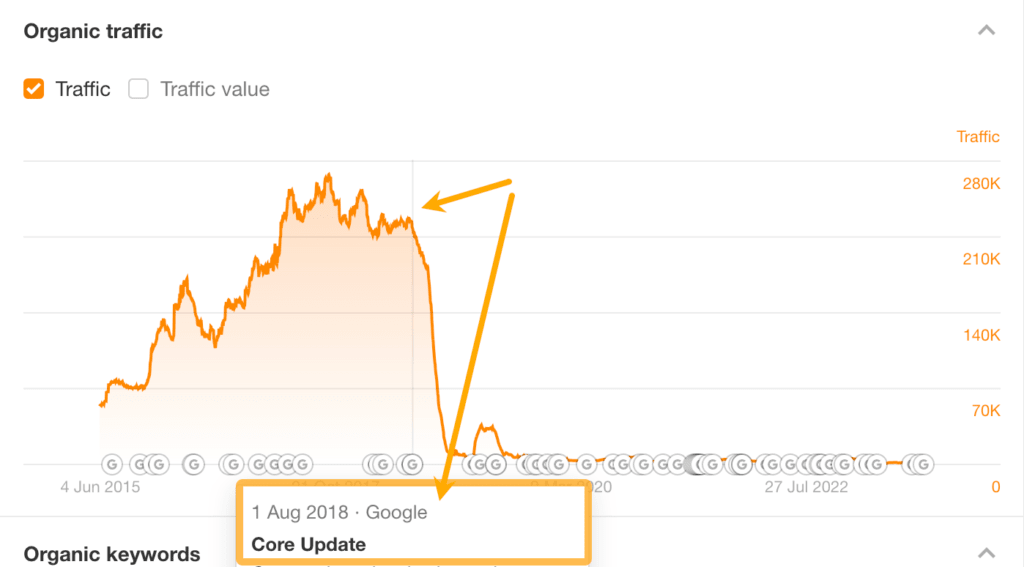
| TIP 💡 Always double-check that Ahrefs estimates align with reality before jumping to conclusions. You can do this in GSC. |
If you see a traffic drop aligning with a Google update, your next step is to investigate what the update targeted for insight into what might have caused the drop. Our list of Google algorithm updates can help with that.
For example, if you saw a traffic drop around 21st February 2023, it's likely that it was the product reviews update (assuming you publish this kind of content, of course).
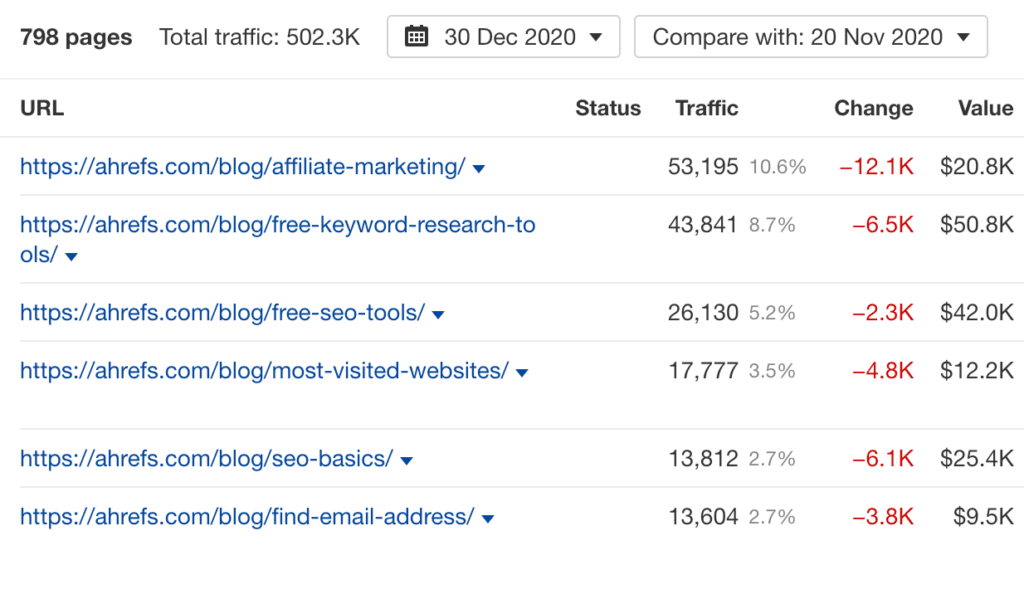
You can also use the Top pages report in Site Explorer to narrow down any issues that might be related to a specific type of page or section of the site. To do that, compare traffic between two dates (one before and one after the update) and see which pages had the biggest traffic declines.
Have any specific pages lost significant traffic recently?
Even if your site's overall organic traffic is stable or improving, traffic to some pages could be declining. This can point to quality issues with certain pages (lack of EEAT, unhelpful or outdated content, etc.).
To find pages with the biggest estimated organic traffic losses in the last 6 months, you can use Site Explorer.
- Enter your domain into Site Explorer
- Go to the Opportunities report
- Click the "Content with declining traffic" issue
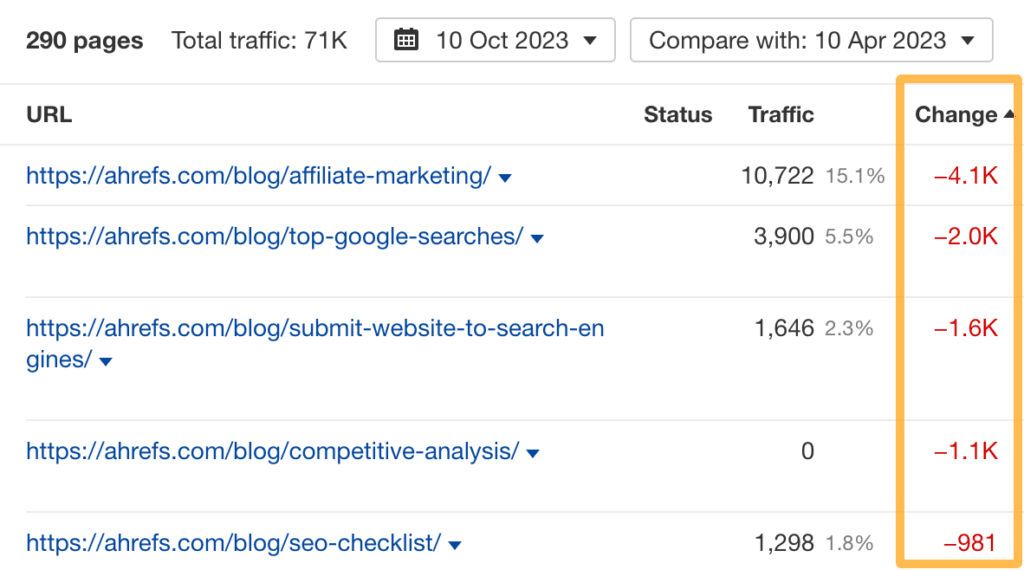
| TIP 💡 Again, always double-check that Ahrefs estimates align with reality before jumping to conclusions. You can do this in GSC. |
If you see pages with significant traffic drops, investigate them further. A good starting point is to plug the individual URLs back into Site Explorer and check whether the traffic drop to the page coincides with a Google update.
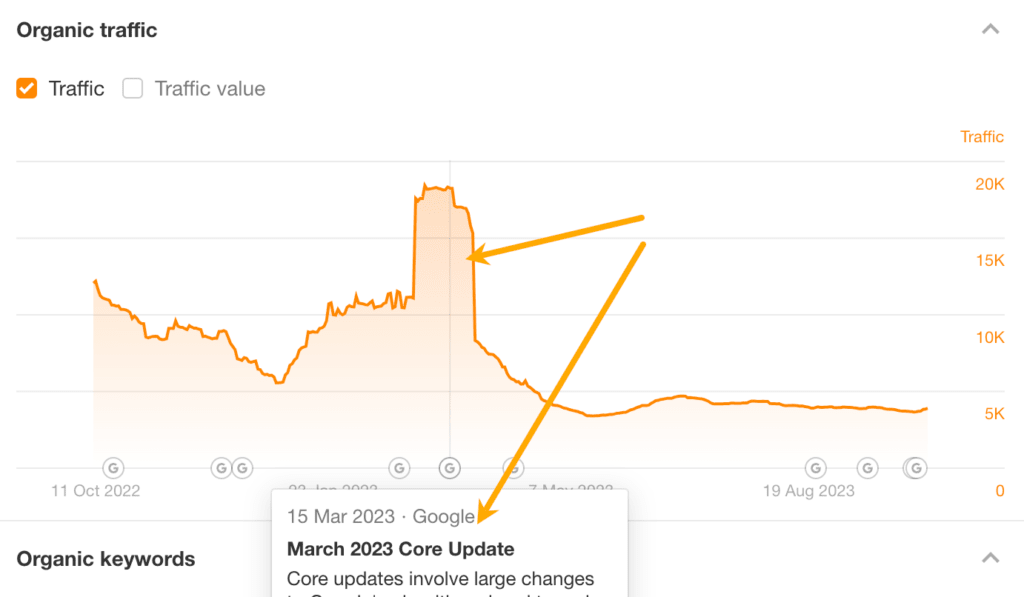
If it does, read up on what the update affected. If it didn't, check for other issues such as outdated content or unhelpful advice.
Have you got any dead pages with backlinks you could redirect?
Backlinks to broken pages are effectively wasted. You can reclaim their value by reinstating the dead page or redirecting them to another relevant page. To find broken pages with backlinks, you can use Ahrefs' Site Explorer.
- Enter your domain into Site Explorer
- Go to the Opportunities report
- Click the "Redirects to implement" opportunity
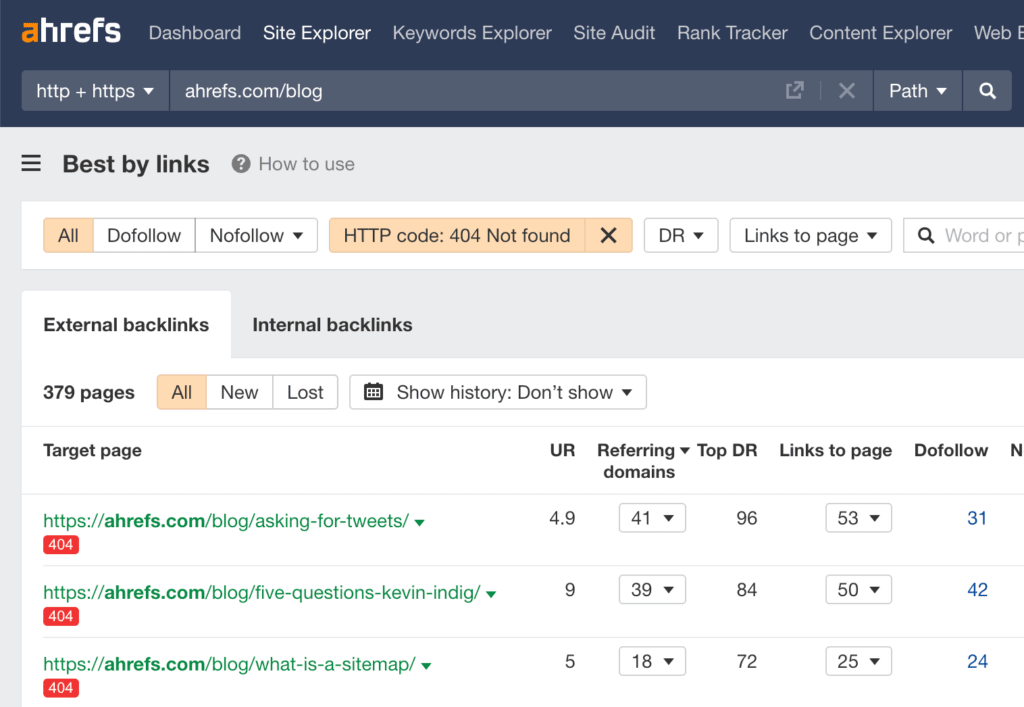
Follow this flowchart to find the best course of action for each dead URL:
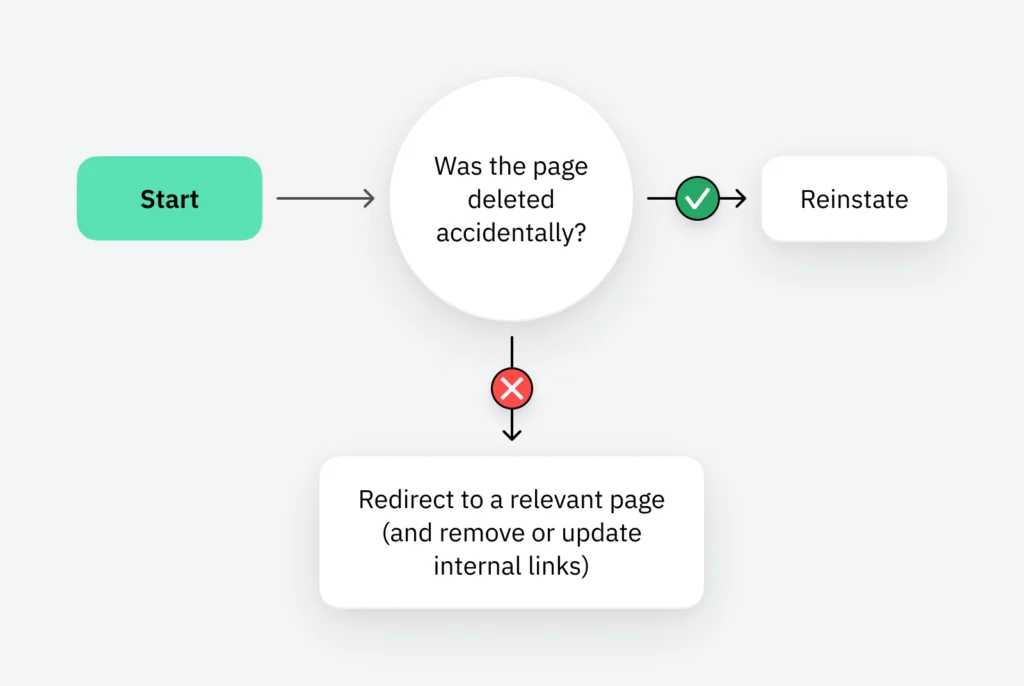
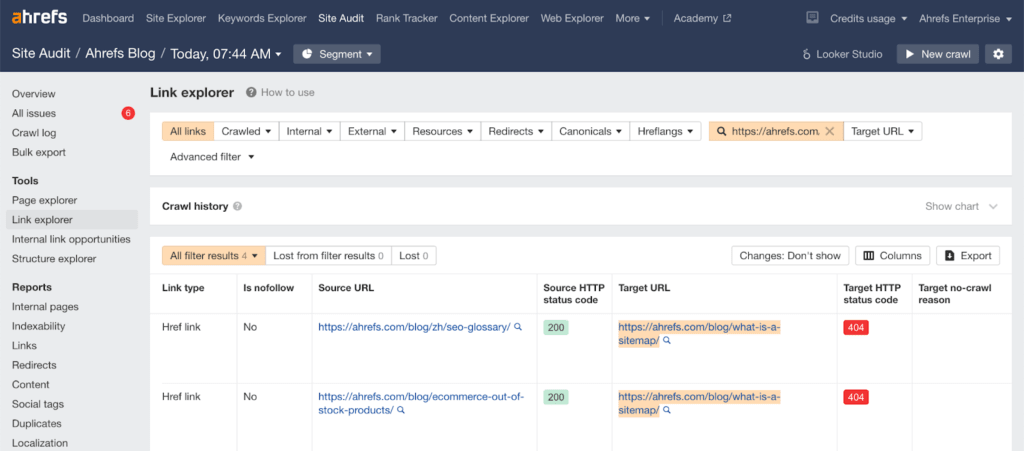
You can use Ahrefs' Site Audit to find internal links to a broken page. Just go to Link Explorer, paste the dead page's URL into the search box, and select "Target page" from the dropdown.
Could you boost any pages with internal links?
Internal links are links from one page on your website to another. Adding them to important pages can help to boost their rankings. You can find relevant internal linking opportunities in Ahrefs' Site Audit.
- Go to your site's project in Site Audit
- Click the Internal Link Opportunities tool
Pay attention to the Source page, Keyword context, and Target page columns. These tell you where it might make sense to add internal links to and from.

For example, the suggestion above is to add a link to our post about faceted navigation from the section mentioning that term in our guide to duplicate content.
| TIP 💡 If you want to prioritize adding internal links to a particular page, such as one ranking in positions 2-10 already (which is where you'll probably get the most bang for your buck), paste its URL into the search box and select "Target page" from the dropdown. |
Does the website elicit trust and prominently display E-E-A-T signals?
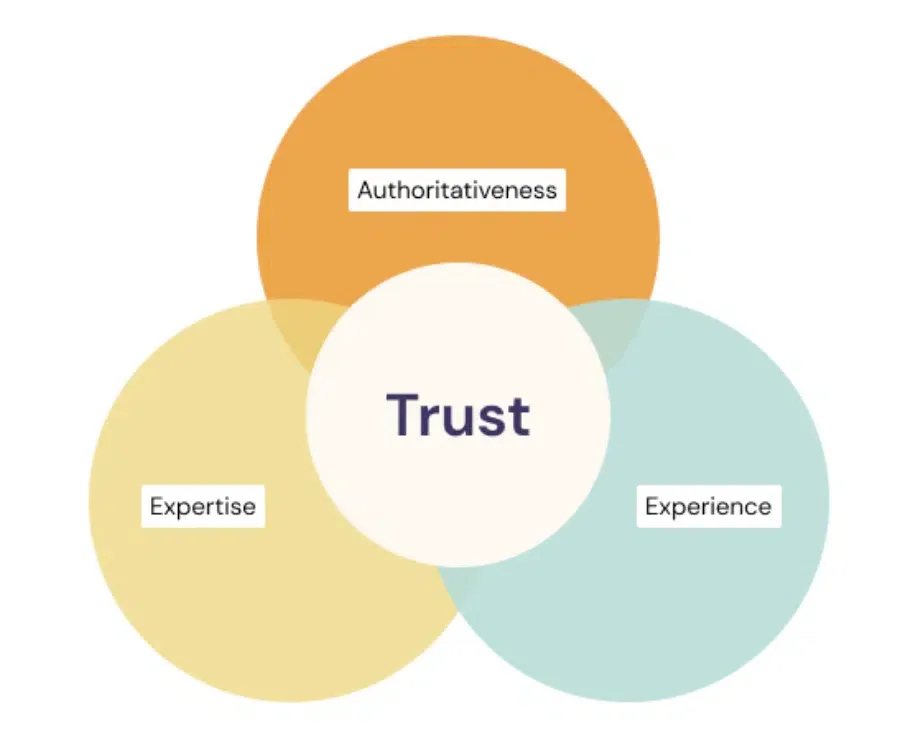
Many algorithm updates focus on improving the quality of search results by surfacing credible, trustworthy information. The framework Google uses to achieve this is called E-E-A-T and stands for:
- Experience
- Expertise
- Authoritativeness
- Trustworthiness
To check your website’s credibility, browse through the most frequently visited pages like the homepage, about page, contact page, and other core pages.
Assess whether you have the following elements and if not, consider adding as many as possible to your website:
- Individual profile pages for staff, authors, or other people connected to the business
- Links to professional profiles and social media pages for each staff member
- Prominent reviews from third-party tools like Google Business Profile
- Genuine testimonials, including video where possible
- Mentions of certifications, accreditations and licenses
- Featured awards and industry associations
- Contact details that are easy to find and make your business seem legitimate
- Blog posts written or reviewed by subject matter experts
- Mentions of reviewers and contributors in the byline for all blog posts
For more details and insights into the E-E-A-T framework, check out page 26 of Google’s Search Quality Rater Guidelines.
Content
Is your content unique, easy to read, and of a high quality?
With the rise of AI-generated content, Google has prioritized the need for quality, helpful content that best meets the needs of users.
It can be challenging to assess the quality of your content without spending a long time going through each page individually. Here are a handful of markers you can export in bulk to give you clues as to which pages may need attention first.
Word count
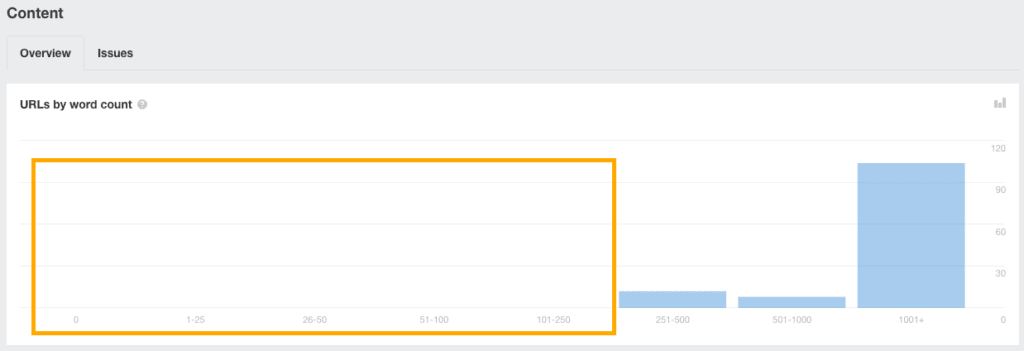
Pages with a low word count can indicate thin content. You can go to Ahrefs’ Site Audit > Content report and check if you have many pages with less than 250 words.
Internal duplication
In Site Audit, you can also check the Duplicates report and pay attention to any pages marked as “bad duplicates” or where there is duplication but the canonical is not matching.
Readability
Readability alone is not a direct factor affecting the quality of your content. However, it can influence user experience signals and the perceived ‘helpfulness’ of your content, both of which affect SEO rankings.
You can also use readability as a quick indicator that other best practices for writing online content have not been followed. For example, many writers are great at writing for print but not online. Therefore, they also aren’t aware of how to best optimize their content, or how to meet online search intent.
Readability is an easy clue to help identify pages that may have such issues so you don’t have to check each page on your site one-by-one.
You can get a quick sense of readability issues using Experte. Add your website link and then let it calculate readability across your website in bulk. Then, take a close look at pages marked as any degree of “difficult” to read.
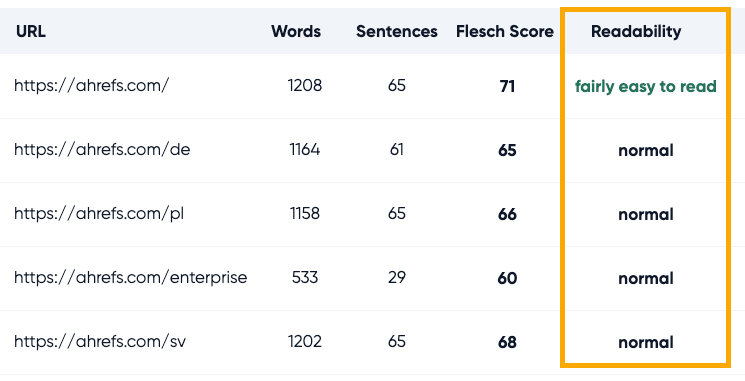
On these pages, assess the following:
- Can the content be simplified to appeal to more people?
- Has the writer optimized their content according to SEO best practices?
- Is the reading difficulty affecting how helpful the content is perceived to be?
- Does the content provide a great user experience that meets a searcher’s intent?
If you find such issues, start updating these pages so they meet best practices, are better optimized, and provide a better user experience.
| TIP 💡 These markers are intended to give you quick insights into potential issues and save you from having to look at each page individually. However, if you would like to run a more thorough content audit, you can use our process and template in this article: Follow Our Content Audit Process for 2023 (Template Included). |
Are the titles on each page compelling?
Page titles can singlehandedly influence whether someone chooses to click through to your content from search engines or not.
It’s a little difficult to objectively identify if your page titles are compelling, though you can use the clickthrough rate (CTR) metric in GSC to help.
Open up the Performance report, set the time period you’d like to gather data for, and then export the results.
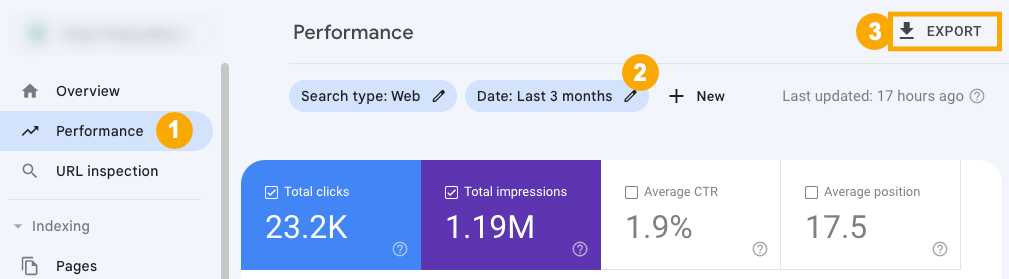
In the export, go to the “Pages” tab and check out the CTR values.
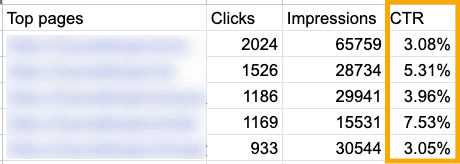
You can find some quick-win opportunities by looking at pages that are ranking in top positions but have a very low clickthrough rate.
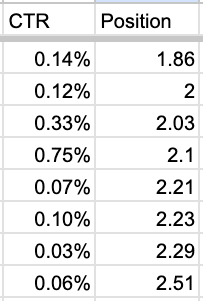
These pages are at risk of losing both rankings and traffic, especially if users click on results lower than yours. They are also the ones you can get some quick traffic gains just by improving the page title.
Try using ChatGPT to help make the titles on these pages more compelling and to encourage more people to click through. Then, track any changes to the clickthrough rates on the pages you improved.
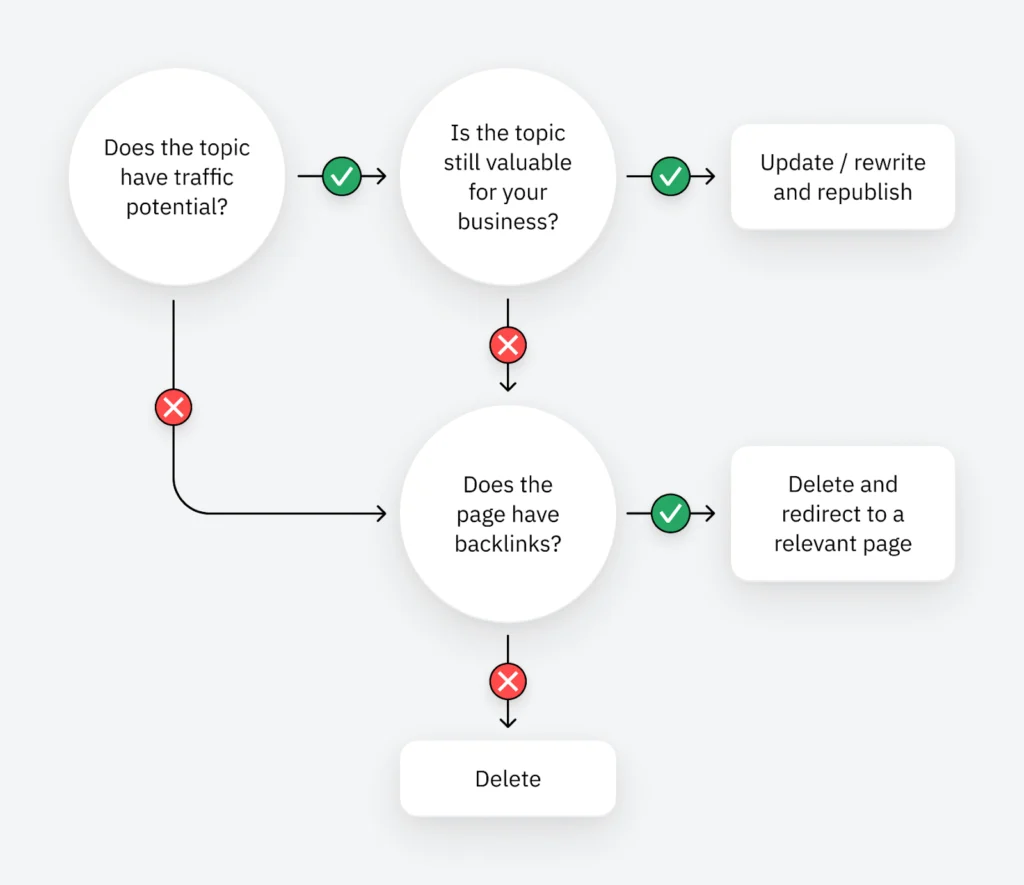
Have you got any old pages with low traffic?
Old pages with little or no traffic are low-hanging fruit. You can often boost their performance by updating or rewriting them. Alternatively, if they're no longer needed but have backlinks, you can delete and redirect them to boost other pages.
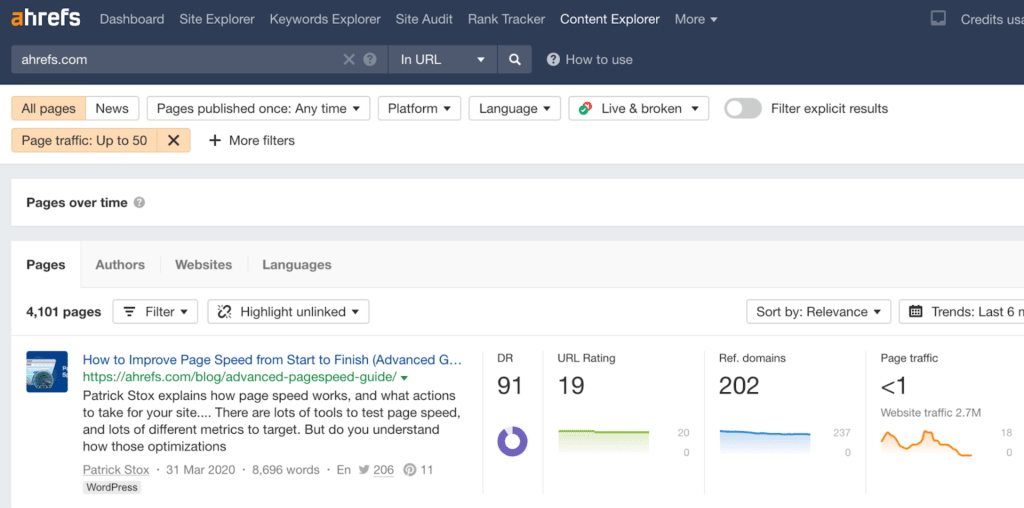
You can find old pages with little or no traffic in Ahrefs.
- Enter your domain into Site Explorer
- Go to the Opportunities report
- Click the "Pages only published once" issue
Follow this flowchart to figure out the best course of action for each URL:
Have you got any low-hanging fruit keywords?
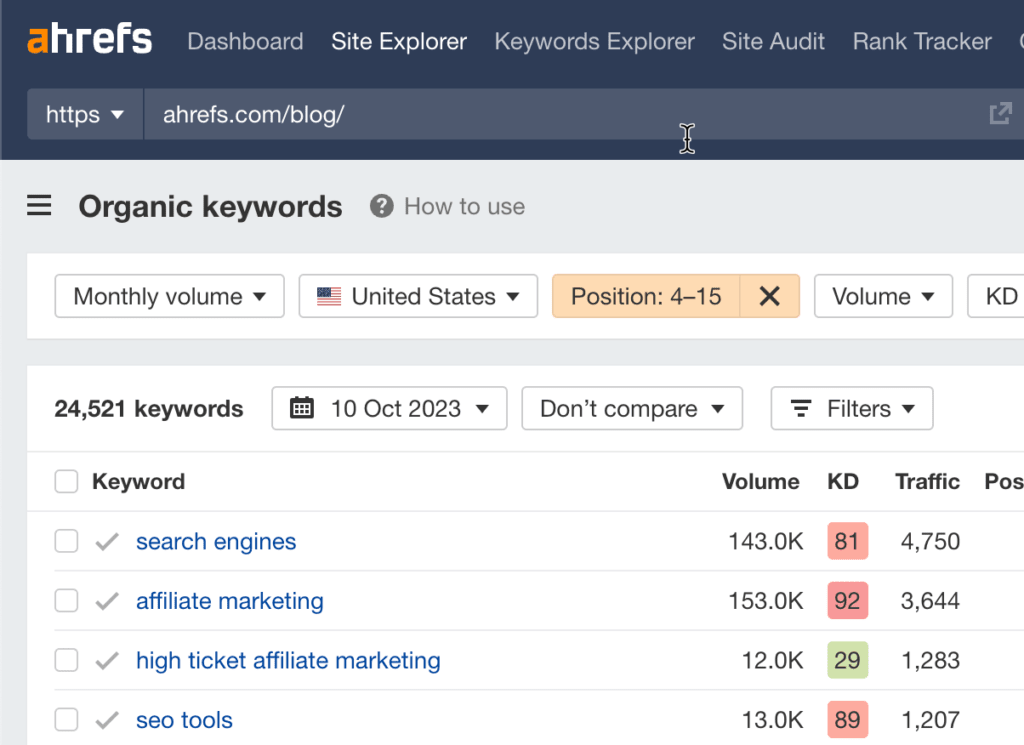
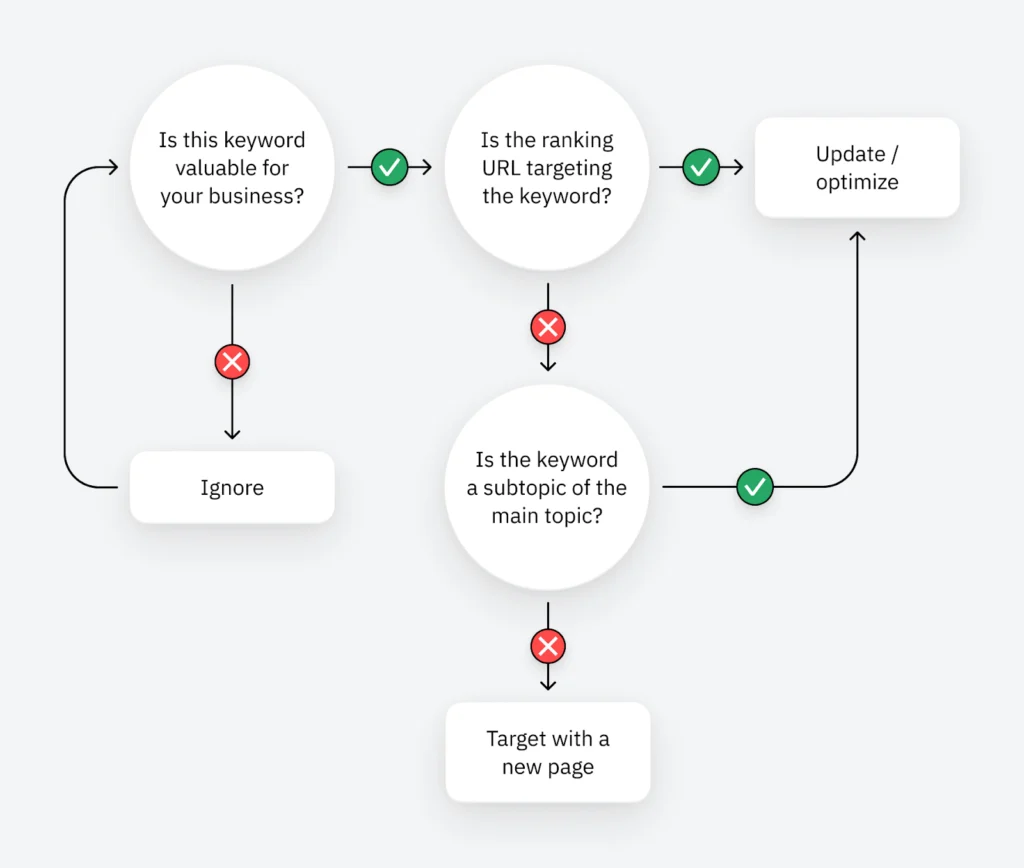
Pages that rank in positions 4-15 are low-hanging fruit. Boosting them by just a few positions can send tons more traffic their way. You can find these keywords in Ahrefs' Site Explorer.
- Enter your domain into Site Explorer
- Go to the Opportunities report
- Click the "Low-hanging fruit keywords" issue
Follow this flowchart to find the best course of action for each keyword:
Have you got any low-hanging featured snippet opportunities?
Featured snippets are boxes that appear at the top search results for some keywords. They show a short, relevant snippet from one of the top-ranking pages.
If you already rank in positions 2-8 for a keyword with a snippet, that's low-hanging fruit. You can often shortcut your way to the top of Google by winning the snippet. You can use Ahrefs' Site Explorer to find the best featured snippet opportunities.
- Enter your domain into Site Explorer
- Go to the Opportunities report
- Click the "Featured snippets" opportunity
This will show you keywords where you currently rank in positions 2-8 where Google shows a featured snippet.
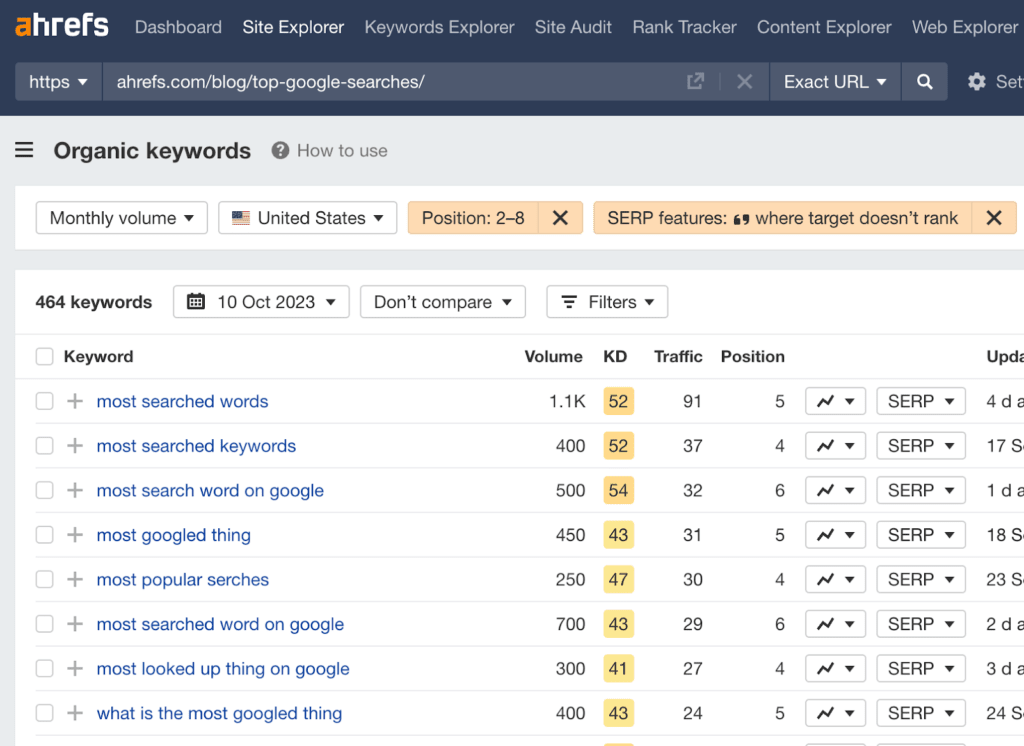
Follow the advice in this guide to optimize for the snippets.
Have you got any content gaps with competitors?
If competitors are ranking for keywords you haven't covered, these are content gaps that may be worth covering. You can find these in Ahrefs' Site Explorer.
- Enter your domain into Site Explorer
- Go to the Opportunities report
- Click the "Top suggestions from Content gap" opportunity
This will take your top organic competitors and look for keywords they rank for in the top 10 where you're nowhere to be seen in the top 100.
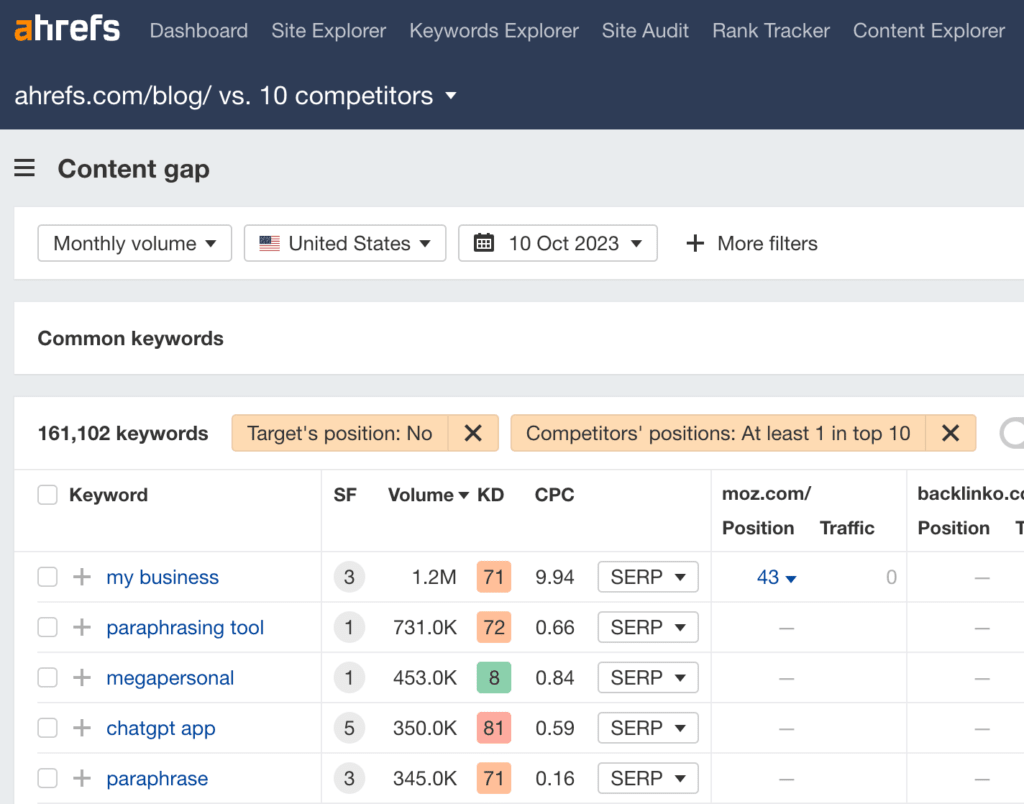
Consider covering these topics if they are likely to have value for your business.
Design + UX
Is the design modern and optimized for the best user experience?
User experience is a critical element of a good website. Not only does it impact sales and conversions, but poor experience impacts SEO performance too.
To audit your website for potential UX issues, you’ll need to click through the core pages and assess things like:
- Is the website design modern and adhering to best practices?
- Does the design feel cluttered and potentially lead the reader to analysis paralysis?
- Does the design feel like a giant “wall of text” or lead to information overwhelm?
- Are the calls to action simple, clear, and functioning as expected?
- Does the website lack a feeling of credibility?
- Is all the content legible, especially against background images?
You can also use platforms like User Testing to hear feedback from other people using the website and discover more things leading to a poor user experience.
Do all pages have mobile-friendly layouts and responsive design?
Mobile-friendliness is important because these days, over 50% of web traffic is likely to come from mobile and handheld devices.
To test out how mobile-friendly your site is, you can run a bulk test using Experte’s mobile-friendly tester. Just enter your website and the tool will automatically check every page it can crawl using the same data as Google’s mobile-friendly tester.
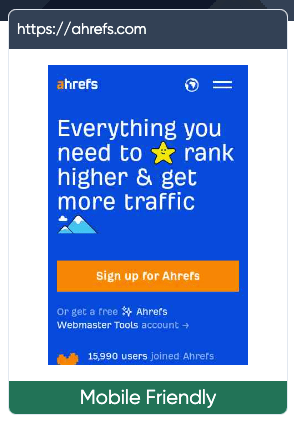
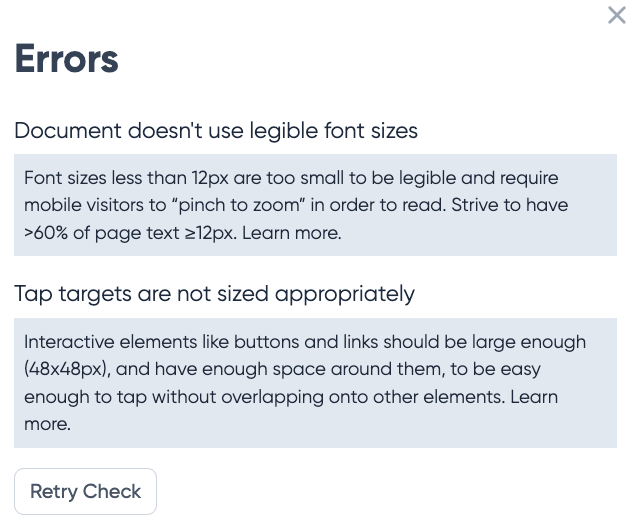
For any pages that “need improvement”, you can click on the page to see the exact issues you need to fix, for example:
If you notice such issues, consider adapting your URL structure to meet best practices and make sure to 301 redirect the old URLs to your new ones.
A word of warning, however, do not attempt such changes across your entire website if you have never undertaken a project like this before. Consult with an SEO expert who can help you manage the URL migration so you avoid any accidental disasters.
Is the navigation intuitive?
A website’s navigation system is a critical way for users to find the information they’re looking for quickly and easily.
Common issues that affect the UX of your navigation include:
- Unconventional design elements
- Overly creative design that leaves users confused
- Unclear navigation on mobile devices
- Overwhelming mega menus
- Missing or unimportant pages in the navigation
- Unclear labels used for menu items
For example, Zara’s navigation design is not only difficult to see against the image background, but it also subverts expected design elements and functionality.

Users would not typically look under the logo for the navigation links.
Putting that aside, when you click on these links, they open up a modal that’s overwhelming and makes it difficult for a user to quickly find what they want.
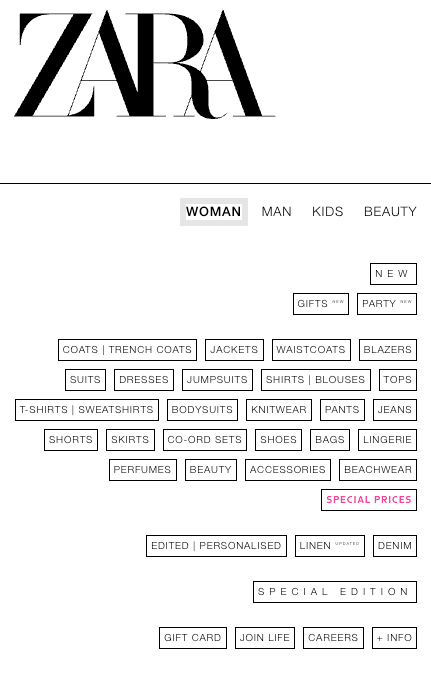
Compare that experience with say, Urban Revivo, another online fashion store. Here’s the what the navigation looks like when hovering over “Women”.
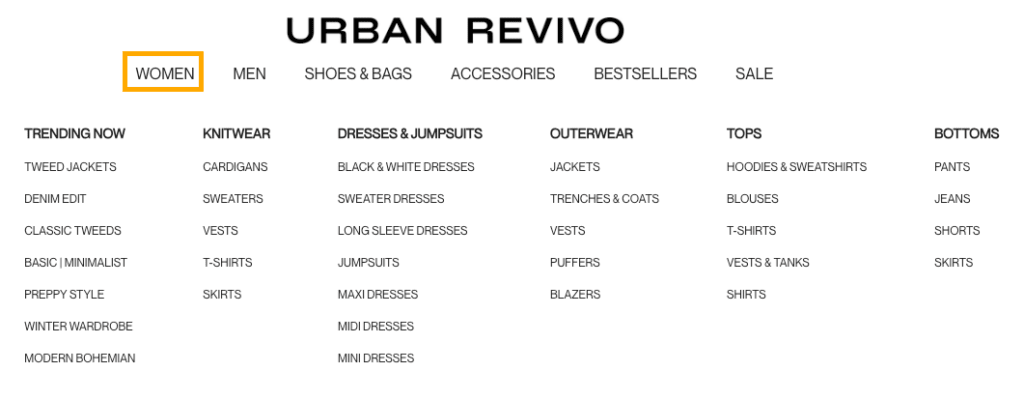
The bolded categories grab immediate attention and make it much easier to find what you’re looking for. Where Zara’s navigation lacks structure, Urban Revivo’s more than covers the gap.
When auditing navigation issues, it also really helps to have other people test out the navigation to avoid any potential blind spots. Something that makes sense to you may not to other people.
A popular method to use for this is card sorting. It helps identify clear categories and labels that make sense to most people. Here’s how it works:
- Gather a list of pages or topics the participants will need to organize.
- Write each page’s name or topic on a card.
- Ask participants to sort these cards into groups they think make the most sense and to talk through their choices.
- Ask the participant to label their groups.
- Align your navigation groups and labels with the results from this test.
Does the on-site search function as expected?
On-site search is another critical element of a website’s navigation. However, while it is intended by web designers to make people’s lives easier, the reality is that a lot of the time it’s the opposite.
To audit this element of your website, try manually testing out the functionality and going through the search possess as though you were a user.
As an example, let’s take a look at Zara’s website again.
Instead of placing the main navigation elements along the top, where they’re expected, Zara has what looks like a search bar.
Based on the design, you’d expect that clicking on this element would allow you to then type in a specific query to help you find what you’re looking for faster.
But, instead, it opens up a whole new page.
So really, it looks like a search bar, it calls itself a search bar, but it’s just a glorified button. Talk about confusing.
Let’s continue with this example and say we search for “bronzer” on the page we’ve been taken to. Here’s a snapshot of the results:

The first few items are what we’d expect to find. However, the bronze-colored shoes, dresses, and clothing items are not even close.
If your search result pages return too many unrelated results to the query, it can become a frustrating experience for users. Keep testing the search function in this way to uncover potential user experience issues worth fixing.
Are there any intrusive popups or interstitials?
Pop-ups aren’t always bad. Things like exit pop-ups or cookie warnings serve a legitimate purpose.
However, there’s nothing more annoying than landing on a web page only to be hit by a myriad of pop-ups and ads the second you land on the page.
Before we get a chance to read a single word, we’re hit with a full-screen “welcome mat” that obstructs the content.
That has a negative effect on two things:
- Conversions — People can’t buy anything unless they’re on your site.
- SEO — Having visitors hit the back button as soon as they land on your page is known as “pogo-sticking.” There’s some evidence that this tells Google there’s something undesirable about your page and that it doesn’t deserve to rank.
Speaking of SEO, Google also penalizes “pages that show intrusive interstitials” on mobile.
So do yourself a favor: Load your website in an incognito window and see what happens. If there are lots of pop-ups, remove them.
Accessibility
Does the website meet ADA & WCAG compliance requirements?
There are multiple initiatives aimed at making the web more accessible for those with disabilities. ADA standards for Accessible Design and WCAG are two common frameworks that can carry legal implications for companies that do not have accessible websites.
These standards overlap with many SEO and UX best practices and include things like:
- Accessible buttons, fonts and files
- All alt text and links anchors are descriptive
- All multimedia files are captioned
- Keyboard-only navigation of a website is enabled
- Skip navigation + zoom functionality are enabled
- Minimal distracting elements or flashing images
- HTML encoded headings on each page
- Text is legible on all pages and devices
While it’s worth taking time to understand exactly what goes into accessible web design, the good news is that you don’t have to.
You can run a bulk analysis using Experte’s accessibility checker. Just enter your home page and it will crawl all pages on your site, providing a report on all the items your pages pass and also those they don’t.
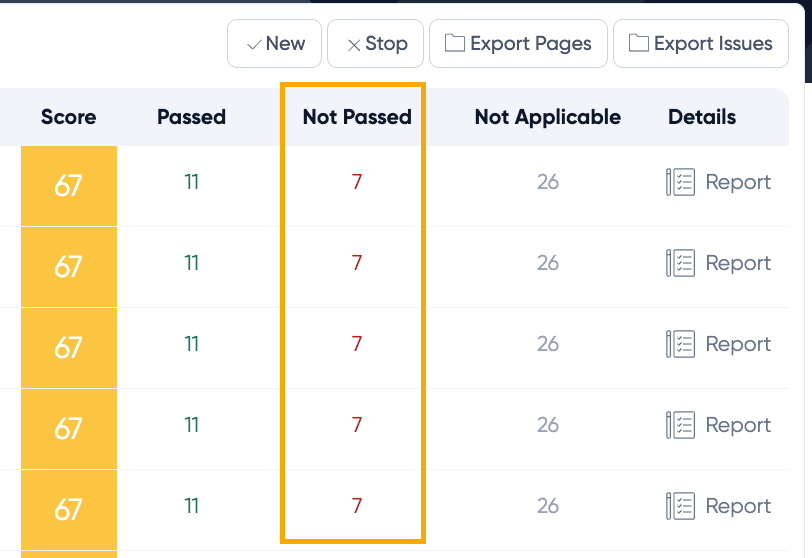
Click on the report on the far right for more details on the exact issues you need to fix on each page.
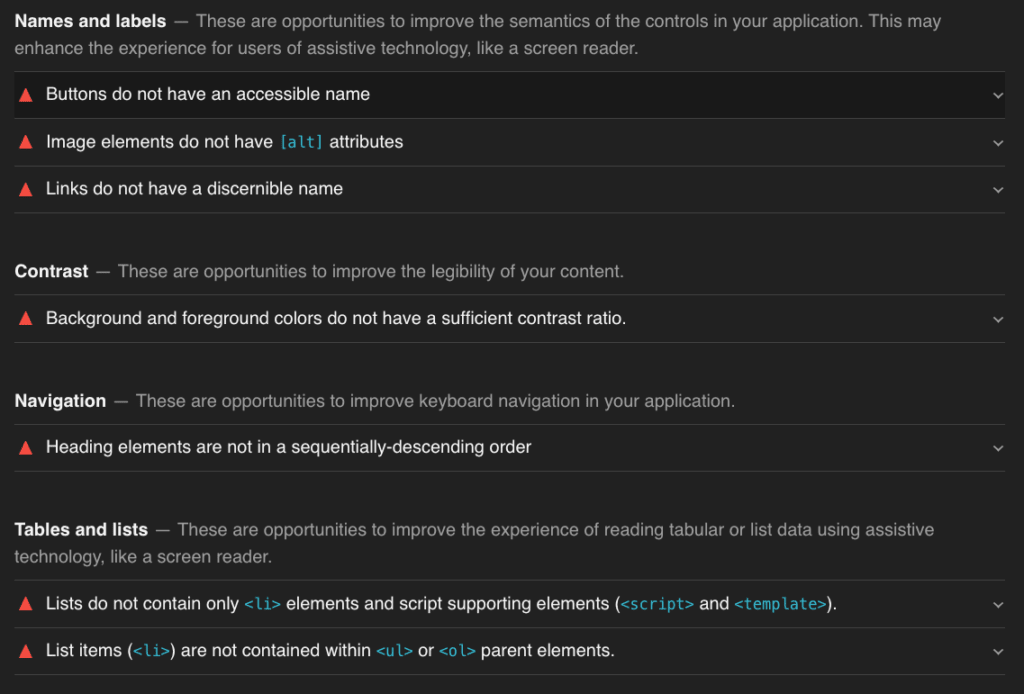
In many cases, if you fix the issue once, it will roll out across the entire site so you don’t have to worry about fixing it for each individual page..
Data Privacy + Security
Have adequate security plugins or protocols been implemented?
It goes without saying that security is crucial for websites. To make sure your website meets security best practices, consider the following:
- Do you have adequate security tools installed?
- If you’re on WordPress, you can install plugins, like Wordfence.
- Do you have an SSL certificate installed?
- Are there any http URLs on your website?
- Have you updated the technology used to build your website regularly?
- Have you used strong passwords that are difficult for hackers to guess?
- Have you backed up your website regularly?
- Do you run frequent security scans to check for malware, phishing, and unwanted software?
If you’re ever unsure, enter your website on Experte’s security checker to get a quick update on any issues or vulnerabilities to fix. You can also check out your hosting dashboard to see your latest backups and security scans.
Are there any security issues showing up in GSC or monitoring tools?
Google Search Console is another tool you can use to identify any security risks or threats. It’s worth checking out the “Security Issues” report fairly regularly to make sure you can fix vulnerabilities asap!
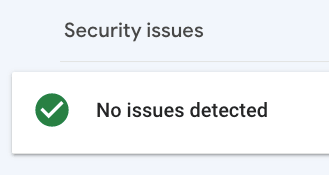
Does the website comply with local data privacy laws, like GDPR?
Data privacy laws are being introduced all over the world with GDPR being the most commonly known. As helpful as analytics and performance tracking tools are, many of them now break such laws.
To check your website’s compliance, you can use a free tool like CookieBot. If you see “high risk” results like the following, start fixing these issues pronto!
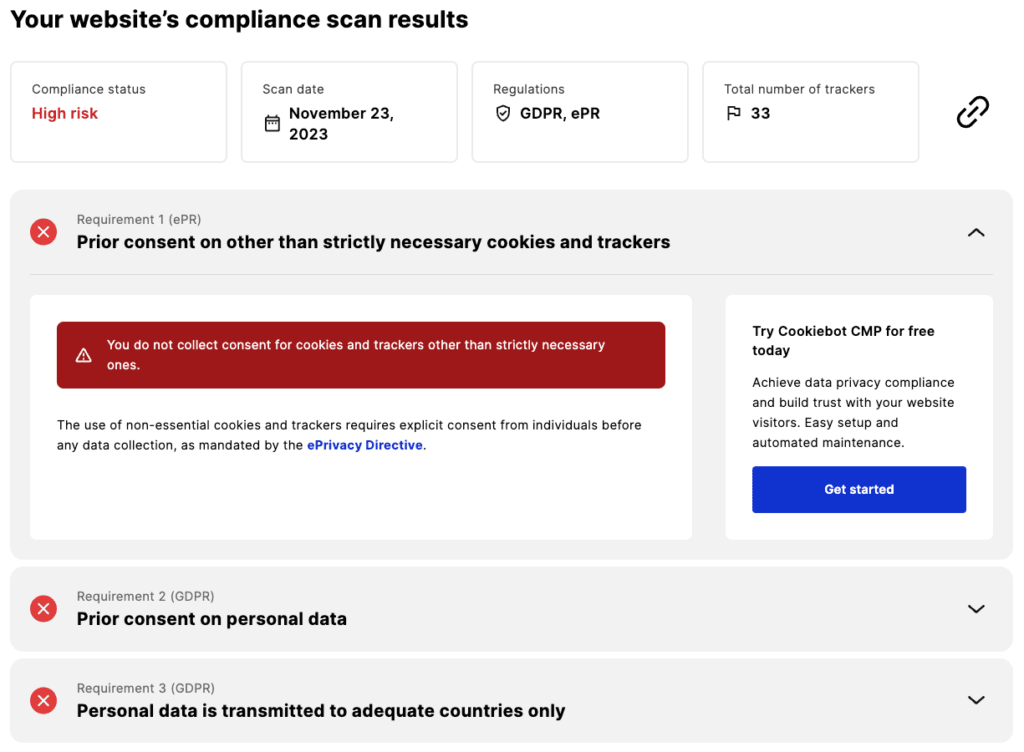
There are many tools similar to CookieBot that can help you automate data privacy compliance. It’s worth doing some research to find the best option for your website’s needs.
Frequently Asked Questions About Website Audits
How often should I audit my website?
Conduct comprehensive audits quarterly for most businesses. Increase frequency to monthly if you operate in highly competitive industries, run large e-commerce sites with frequent product updates, or have recently experienced significant traffic changes. Additionally, perform targeted mini-audits after major algorithm updates, site redesigns, or when launching important new content sections.
Can I do a website audit myself or should I hire someone?
You can definitely conduct basic audits yourself using free tools like Google Search Console and Google Analytics. This approach works well for small businesses with limited budgets or those just starting their SEO journey. However, hiring an SEO specialist becomes valuable when you need advanced technical diagnosis, lack time to learn complex tools, want faster results through experience-based insights, or need to audit large sites with thousands of pages. Consider starting with a DIY audit to understand fundamentals, then bringing in expertise for implementation and advanced optimization.
What's the best free website audit tool?
Google Search Console stands as the essential free website audit tool because it provides data directly from Google about how they view your site. Combine it with Google Analytics for user behavior insights, PageSpeed Insights for performance metrics, and Screaming Frog's free version (up to 500 URLs) for technical crawling. Together, these free tools cover 75-80% of what you'd get from premium solutions. For most small to medium businesses, this combination provides more than enough data to drive meaningful improvements.
How long does a complete website audit take?
Timeline varies significantly based on site size and audit depth. A basic audit of a small site (10-50 pages) takes 4-8 hours. Medium sites (50-500 pages) require 1-3 days for thorough analysis. Large sites (500+ pages) or e-commerce platforms need 3-7 days for comprehensive auditing. These estimates include data collection, analysis, and report creation but not implementation time. Remember that implementation typically takes 2-10 times longer than the audit itself, depending on issues discovered.
Start Your Website Audit Today
A comprehensive website audit isn't just a technical exercise—it's a strategic investment in your digital growth. The insights you gain reveal exactly where to focus efforts for maximum impact on traffic, rankings, and conversions.
Start with the free tools and basic checklist outlined above. Even identifying and fixing just three critical issues can significantly boost your search visibility. As you gain confidence, expand into more advanced auditing techniques and consider bringing in specialized expertise for complex challenges.
The websites that consistently dominate search results aren't necessarily those with the biggest budgets—they're the ones that audit regularly, act on findings quickly, and continuously optimize based on data.
Ready to discover what's holding your website back? I've helped dozens of businesses transform their digital presence through comprehensive website audits and strategic SEO implementation. Book a free consultation to discuss your specific challenges, or explore my case studies to see real results from clients just like you.
Let's unlock your website's full potential together. Your competitors are already optimizing—make sure you're not getting left behind.
About the Author: Sadekur Rahman is an SEO Specialist helping businesses improve their online visibility and search engine rankings through data-driven strategies and comprehensive website optimization. With experience across multiple industries, Sadekur combines technical expertise with practical implementation to deliver measurable results. Learn more about working together or view pricing plans.

Written by Sadekur Rahman
SEO & Website Strategy Specialist at Pixelvega and SEO Executive at Daily Amar Desh. 6+ years helping brands grow with data-driven SEO.